Camera Basics
 Camera Choosing
 Camera Models
 Camera Buying
 DSLR Buying

Fujifilm Finepix HS10 Review
 10 Megapixels
 Ultra-Zoom: At least 10X optical zoom.
 Electronic View Finder
 High ISO: ISO 6400 or more is available at full-resolution.
 Stabilization: Compensates for tiny involuntary movements of the camera.
 Continuous Drive
 Full 1080p HD Video: 1920 x 1080 resolution or more but less than 4K.
 Manual Controls: Both fully-manual (M) and semi-automatic modes (T and V).
 Custom White-Balance: Specifies exactly what should be white to the camera.
 Action Photography: Shutter speeds of 1/1500 or more.
 Night Photography: Reaches shutter-speeds longer than 4 seconds.
 Hotshoe: Allows external flash units to be attached.
 Spot Metering
 Runs on standard AA batteries
 Accepts Secure Digital High Capacity (SDHC) and SD memory.
 Neocamera detailed review
 Discontinued: No longer produced by the manufacturer. May still be in stock or found used.
 1 - Capability2 - Usability3 - Performance
Fujifilm Finepix HS10 Usability - How easy is it to use?
The basic camera operation of the Fuji Finepix HS10 is strait forward. Although the number of buttons is high, advanced users appreciate having external controls for all commonly used features. The deep contoured grip provides a secure hold on the camera and is mostly comfortable.
The HS10 is powered on by a rotating switch which surrounds the shutter release. It feels solid and has two well-defined positions with audible clicks. Every other button feels just as solid. The camera has an aggressive auto-sleep feature which turns the camera off after a period of inactivity. Unfortunately, waking the camera up requires moving the power-switch to the Off position and back to On. This makes it slower to wake up than most cameras which are woken up by a half-press of the shutter-release.
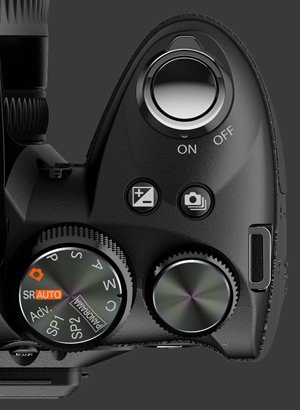
A pleasure of a few digital cameras is a mechanical zoom lens. Fuji has equipped the HS10 with zoom ring which turns smoothly. It small size and the position of the flash means that one has to be careful when turning to not bump against flash-housing. Still, this is much better than not having a zoom ring.
Having a mechanical zoom ring means that zooming from 24 mm to 720 mm can be done in a half a second and there are no zoom steps. There is also a fly-by-wire focus ring which also turns smoothly. The focus ring is responsive and sensitive enough.
The shutter release is pretty standard with a short travel distance. The two buttons behind the shutter, exposure compensation and drive mode are unfortunately too far and indistinct for comfort. Behind those are t he mode dial and top-mounted control-wheel. Both dials rotate easily and have gentle click-stops to avoid accidental changes. Both the mode dial and control wheel are set on a slant for easy reach using the thumb.
Pressing the exposure-compensation button, shows a luminance histogram which is updated in real time as exposure is changed. Unfortunately the HS10 screws up big-time here, something that the S100FS actually got right. The histogram actually is that of the display. Now, if the HS10 was exposure-priority all the time, it would not be a problem. However, the HS10 does not always show the correct exposure before the shutter is pressed halfway, so the preview histogram while using EC can be quite off. This problem should be correctable via a firmware update but since the other CMOS camera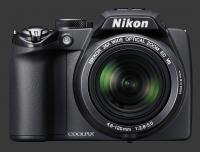
Nikon Coolpix P100 tested exhibited an even worst problem, we have some doubts that there could be a technological problem. The LCD is unfortunately never exposure-priority in S, A, or M mode.
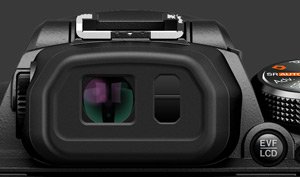
The camera rear is dominated by a large 3" LCD with 230K pixels mounted using a double-hinge for framing flexibility. The hinge seems solid enough that this is not much of a liability problem. Above it is a tiny EVF with an eye-start sensor which switches between the LCD and EVF automatically. Once used to one of these, it is hard to accept anything else. The EVF is not so precise but easy to see and keeps up well. A switch next to the EVF allows to manually switch between the two display, but only if the option to do so is selected in the setup menu.
 To the left of the LCD is a column of buttons to be used in conjunction with the control-wheel. All these functions require two handed operation, so letting go of the lens zoom ring. Unfortunately ISO is among those buttons, it could have been switched with drive mode which is not used as quickly in general. The remaining buttons are: AE, AF mode, AF drive and WB.
The ISO button is also used in conjunction with the control-wheel. It shows the list of possible ISO values, plus 3 Auto settings. Each Auto setting differs in the maximum ISO value that can be chosen. Resolution and dynamic range are automatically adjusted for the chosen ISO when the current setting is incompatible.
The rear of the camera also has a movie-record button, an AE-L button, a Display button, a Playback button and a 4-way control with central OK/Menu button. The movie record button starts and stops video recording. To start it must be held for a second and then it takes about 4s for recording to start. Honestly this is quite terrible for video recording as it makes it easy to miss a moment. One thing that Fuji did well is that they include a display mode which shows some guides as to what the video framing will be like. This at least allows to set up initial framing for still objects. It would have been much better to have a dedicated video mode which makes sure the camera is ready to record video and shows accurate framing.
 The 4-way controller has a center button to activate the menu system and select menu options. Each direction is also assigned a function in shooting mode. To the right, the flash mode can be set, but only when the flash is up. The choices available are Auto, Forced and Slow-Synchro. Down chooses 2 or 10s self-timers. Each time a self-timer is used, it resets itself. Left activates Macro or Super-Macro mode. Up activates digital zoom.
The menu system is easy to navigate and most options are quite intuitive. The menu is divided into 2 main tabs. The camera menu is then divided into 4 pages and the setup menu into 6. That is certainly more customization options that we are used to see outside of DSLRs, very well done.
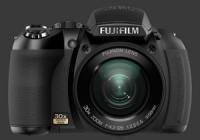
There is an off-center tripod mount at the bottom of the Fuji Finepix HS10. This is problematic for panoramas but for other uses, the camera will be better balanced.
 |



 
|

 Next1 - Capability2 - Usability3 - Performance
Please Support Neocamera
All information on Neocamera is provided free of charge yet running this website is a huge endeavor. Purchases made via affiliate links found throughout the site help keep it running and up-to-date. There is no additional cost to you, so please consider buying via these links to our affilates:




If you found any information on this site valuable and did not purchase via our affiliate links, please considering donating via PayPal:
Any amount will be greatly appreaciated. Thank you for your support!


Fujifilm HS10 Highlights


 Large digital camera
Sensor-Size: 6 x 5mm

Actual size when viewed at 100 DPI
| 10 Megapixels Ultra Zoom | ISO 100-6400 |
| 30X Mechanically Linked Ultra-Wide Optical Zoom | Shutter 1/4000-30s |
| Built-in Stabilization | Full manual controls, including Manual Focus |
| 0.20" Built-in EVF 200K Pixels | Custom white-balance with 2 axis fine-tuning |
| Automatic Eye-Start sensor | Spot-Metering |
| 10 FPS Drive, 7 Images | Hot-Shoe |
| 1920x1080 @ 30 FPS Video Recording | Standard AA Battery |
| 3" LCD 230K Pixels | Secure Digital High Capacity, Internal Memory |
Camera Bag


Your camera bag is empty. To add a camera or lens click on the star next to its name.
Your camera bag is empty.
Add cameras or lenses by clicking on the star next to their name.
Updates
2024.04.03

Fujifilm X-T5 Review
Newest Fujifilm flagship boasting a 40 MP APS-C sensor, 5-axis IBIS with 7-stop efficiency, 15 FPS continuous drive, 6.2K Video capture, dual control-dials and dual SDXC UHS-II slots in a sturdy weatherproof and freezeproof body.
2023.11.20

Best Digital Cameras of 2023
Find out which are the Best Digital Cameras of 2023. All the new Mirrorless Digital Cameras from entry-level to high-end professional.
2023.07.10

Fujifilm X-H2 Review
40 Megapixels APS-C Hybrid Mirrorless Digital Camera with 7-stop IBIS. Fastest shutter ever and 8K video capture. Large builtin EVF with 0.8X magnification and 5.8 MP, plus an Eye-Start Sensor. Packed with features and large number of controls in a weatherproof and freezeproof body.
2023.05.07

Sony FE 20-70mm F/4G Review
Review of the unique Sony FE 20-70mm F/4G lens. The optical zoom of this lens spans ultra-wide-angle and medium focal-length coverage, making it one of the most versatile Full-Frame lenses on the market.
2023.01.15

Huion Inspiroy Dial 2 Review
Review of the Huion Inspiroy Dial 2 tablet, a medium sized drawing surface with dual dials and customizable buttons. Connects via USB-C or Bluetooth 5.0 with Windows, Linux and Android support.
2022.12.08

How to Pack for a Photo Trip
Find out how to pack for a travel photography trip, carry your gear safely while meeting airline regulations.
2022.11.13

Best Digital Cameras of 2022
The best digital cameras of 2022. A short list of the most outstanding models in their respective categories. Choose one for yourself or as a gift.
2022.09.21

Pentax DA* 60-250mm F/4 SDM Review
Review of the Pentax DA* 60-250mm F/4 SDM, the constant-aperture telephoto zoom with the highest zoom-ratio on the market.
2022.09.20

Pentax DA* 50-135mm F/2.8 SDM Review
Review of the Pentax DA* 50-135mm F/2.8 SDM, the lightest professional telephoto zoom native to the K-mount.
2022.09.10

Pentax DA* 11-18mm F/2.8 DC AW Review
Review of the Pentax DA* 11-18mm F/2.8 DC AW, the widest professional ultra-wide zoom native to the K-mount.
2021.11.24

50 Gifts Under $50 For Photographers in 2021
50 Gifts photographers will love. All for under $50 USD. 2021 Edition.
2021.11.17

Best Digital Cameras for 2021
Neocamera shows which are the very best Digital Cameras for 2021 in every category: Mirrorless, DSLR, Premium Compact, Ultra-Zoom and Rugged.
2024.04.03
2023.11.20
2023.07.10
2023.05.07
2023.01.15
2022.12.08
2022.11.13
2022.09.21
2022.09.20
2022.09.10
2021.11.24
2021.11.17