



 Camera Basics
 Camera Choosing
 Camera Models
 Camera Buying
 DSLR Buying
Adobe Lightroom Classic Review
Introduction
Adobe Photoshop Lightroom Classic is the gold standard of digital photography workflow software. Originally simply called Lightroom in 2007, this software introduced non-destructive editing for the first time in an image processing application while adding Digital Asset Management features. DAM software already existed but Lightroom brought it right when digital photography was booming.

The simple fact that Adobe makes a DAM software overshadows all other contenders. This made competition improbable until Adobe switched to subscription plans requiring perpetual payments. While their Creative Cloud launch was widely unpopular, most bought into the plan for the highly capable suite of Adobe products. At the time, Adobe specifically said that Photoshop Lightroom would not switch but, in late 2017, they did anyway!
Forcing Lightroom users into a subscription has far-reaching consequences. With standard imaging software, like Photoshop, output is stored in files that can be opened by any viewer. A licensed instance of Photoshop is not required to see its output. As mentioned above, Adobe Photoshop Lightroom Classic processes images non-destructively which, by its non-destructive nature, never gets written back to images. One must explicitly Export images for the final output version to be visible anywhere outside of Lightroom.
Lightroom output is only visible while actively paying for a subscription, unless every image is exported in its final version.
Among imaging software companies, Adobe has the most resources and this truly shows with Lightroom Classic. This software supports the photography workflow from import to publishing with powerful and extremely reliable features. Its cataloging functions are solid, offers abundant image processing functions and supports virtually every way of outputting images: exporting, printing, online publishing and even book layout.
Adobe Photoshop Lightroom Classic CC is available exclusively for 64-bit computers running either Windows 10 and Mac OS. The current 10.1 version requires at least a Windows 1903 build or MacOS 10.14. A license of Lightroom Classic is $10 USD per month and comes with 1TB of online storage. It can also come with Photoshop for the same monthly fee, except with 20GB of online space. An annual
Software Review
Lightroom Classic is a digital photography workflow software that combines Digital Asset Management, Image Processing and Publishing into one streamlined application designed for photographers. Its extensive search and filtering features are designed to quickly locate images within a huge photo library, while its non-destructive image-processing tools transform images without quality degradation or heavy disk usage.
Installation & Setup
The Creative Cloud completely takes over software installation by wrapping everything into an Adobe-centric world. The only software that must be installed normally here is Creative Cloud itself. This small application connects users to their subscription and controls software delivery. It takes a few minutes to download and install, including time for online registration and subscribing to a Creative Cloud plan. On a clean system, that never had any Adobe products installed, this easily takes anywhere from 5 to 15 minutes. Otherwise, it can be really long time with potential issues that require downloading tools to cleanup previous Adobe products.
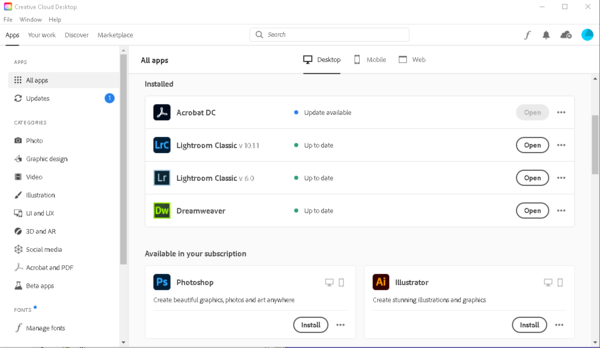
Once the hurdle of having a functional Creative Cloud installed is cleared, installation is not excessively complicated. The application is divided into categories with tabs for Desktop, Mobile and Web software. To install Lightroom Classic, one must find it under the Desktop tab in either the All or the Photo category. Clicking the Install button starts downloading and installing the selected product asynchronously. Software not compatible with the running setup show an error message instead of the Install button. It is possible to install recent older versions in case your system does not support the latest release. Expect to wait minutes, if not over an hour, depending on the speed of your internet connection.
Although a small program, Creative Cloud takes a disproportionate amount of resources and shows misleading practices. It silently installs a few hidden applications and services and offers to update software that is not installed! Note in the above screenshot that Acrobat DC shows Update Available while its Open button is greyed out! One is a Notification Manager that can be removed in the Apps & Programs control panel, while services that run on startup are tedious to remove.
Adobe Photoshop Lightroom Classic can be started directly from Creative Cloud by clicking on Open but can be launched like a normal application. It validates the license with Adobe from time to time but will not launch the entire Creative Cloud process. When Lightroom starts for the first time, a default empty catalog gets created. Users are free to create another or import images into the default one.
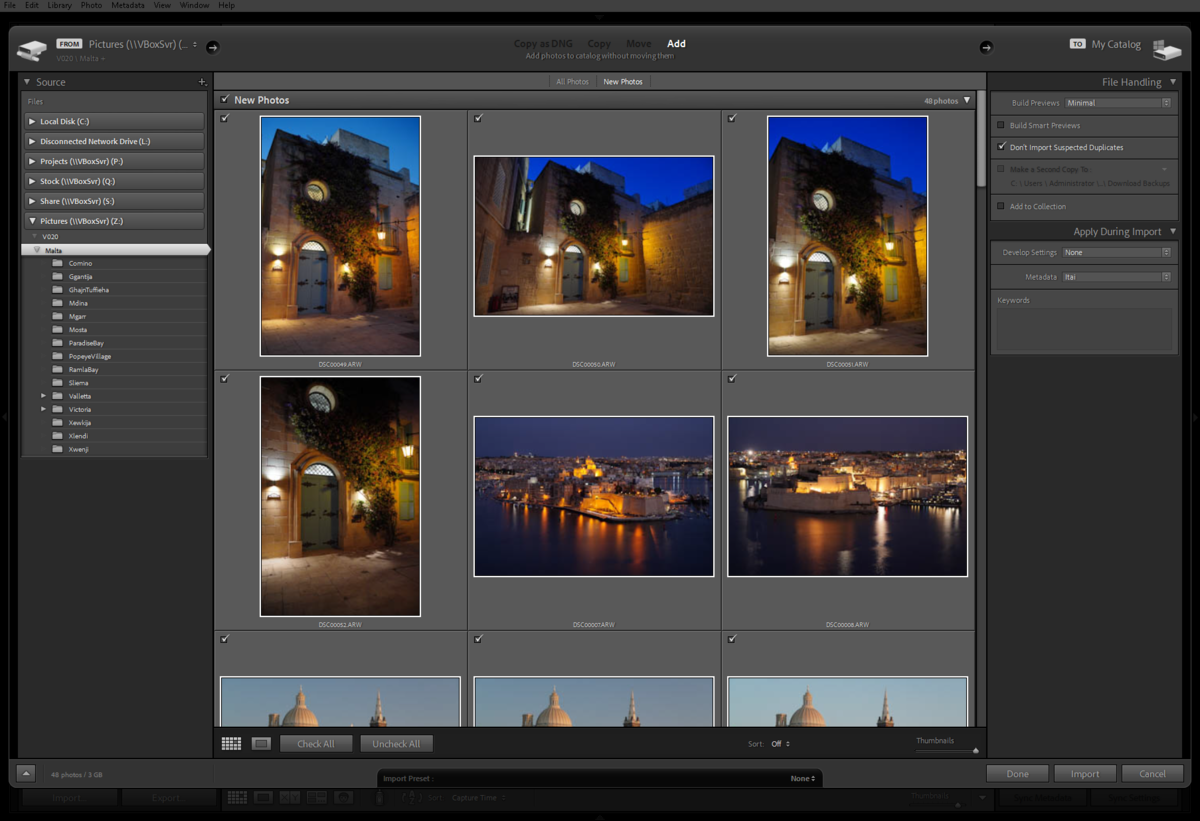
After all the above steps are completed, Lightroom is finally ready. Lightroom works exclusively on imported images and can index videos too. The Import functionality is exceptionally versatile. Since Lightroom Classic can organize images, its Import dialog offers to Copy, Move, Convert to DNG or Add Images in their present location. It can even backup files during the import! Extra options can apply metadata and predefined image processing directly while importing.
Import features simplify the digital photography workflow by automating repetitive tasks. Every DAM software can easily import a file or folder but Presets allows photographers to apply common metadata during the process. Typical usage includes setting the author, copyright and location. Lightroom also supports adding keywords to images and video during import.
User Interface
Built from the ground up, Lightroom Classic adopted a completely different interface than other Adobe products. Instead of the typical MDI interface, with file windows nested without a top-level application window, and a myriad of floating panels, Lightroom lays out its interface in tiles. The central working area is surrounded by collapsible panels on all sides. A neutral grey scheme provides ideal color-perception.
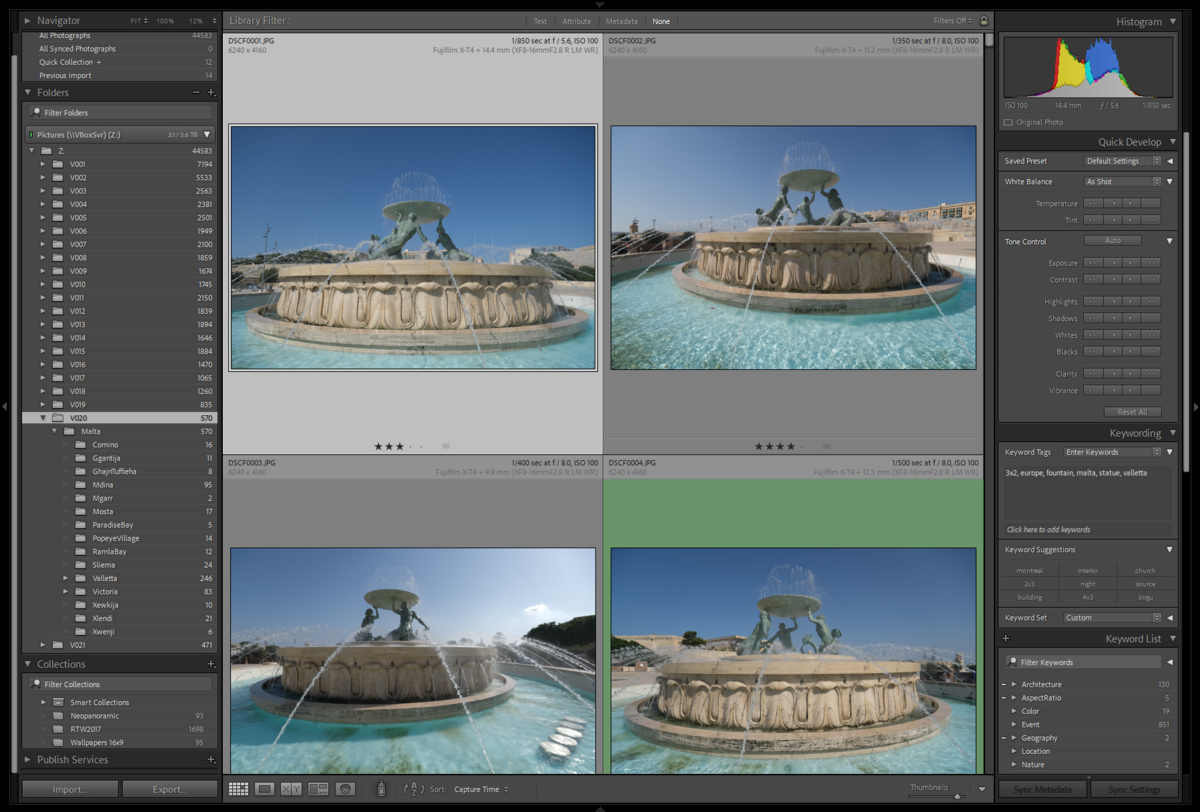
The Lightroom user interface is extremely polished and has been since its initial release. It utilized really well the entire application window space and every element fits together in a cohesive design. Only configuration dialogs are rendered in the style of the operating system. In consideration that Lightroom could be used as a customer-facing product, Adobe includes the an area that can be customized. This Identity Plate can show custom text using any installed font in any color at various sizes or a fixed size image. Users can select the color of the identity plate font and even customize the font and color used for module selection.
Adobe created an interface that parallels the digital photography workflow by splitting Lightroom into Modules that are generally used in sequential steps. The first module is Library which is where files get imported, searched and filtered. The left panel of this module shows three different types of organization: Catalog, Folders and Collections. All these only show images which have been imported, so the Folders view only shows folders with at least one imported image and exclusively show such images. To see other images or videos in a shown folder, one must activate the Synchronize Folder function from the context menu.
Adobe Lightroom Classic provides a natural and intuitive workflow with a sleek and carefully tuned image-centric user interface.
A navigator view that shows an image larger than a thumbnail and a section for Publishing Services which integrates Lightroom to several online image hosting platforms. The Library mode unusually allows coarse image processing or apply Preset development to images. Available features is somewhat arbitrary but it might be useful to certain people.
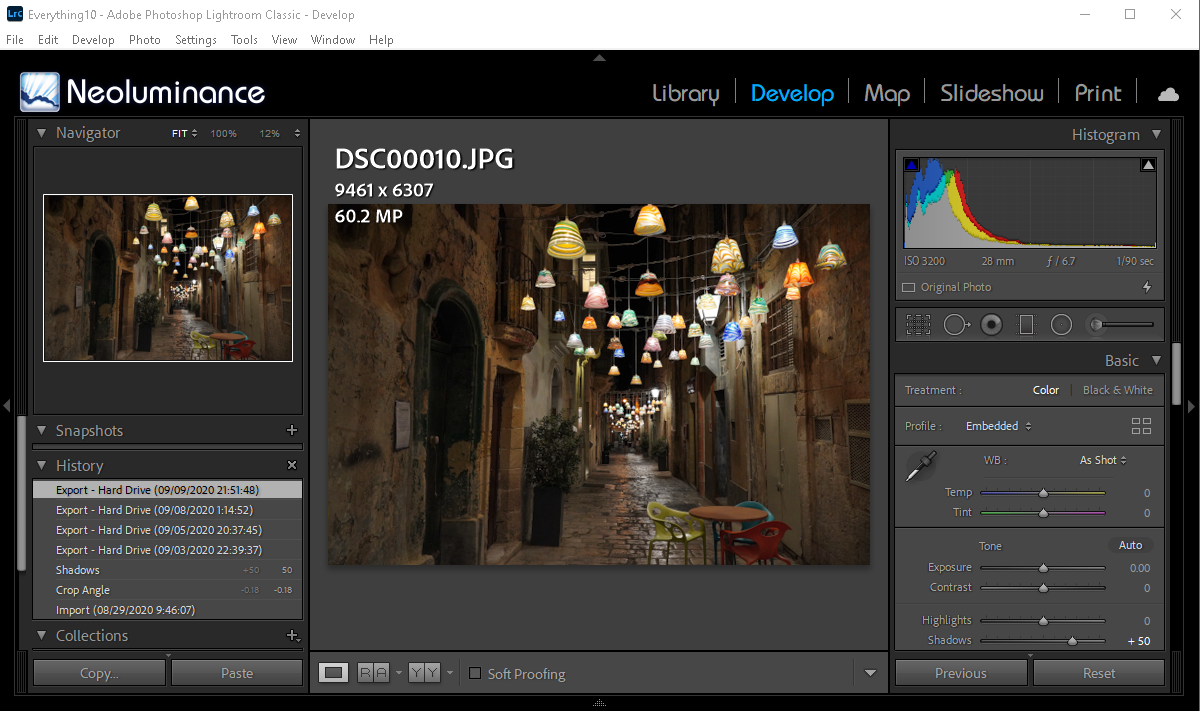
The second module is the Develop module. This is where all image processing functions are available. All edits are non-destructive and so Lightroom shows all steps applied to an image in the History section of the left panel. Any point in the history is instantly viewable simply by selected it. Processing tools appear on the right panel which is divided into expandable sections that group related tools. Note that editing metadata, including keywords, is unfortunately not possible in the Develop module.

A relatively recent addition to Lightroom is now the third module: Map. It shows a zoomable world map with pins showing images that have location metadata. This view can also be used to geolocate images. The remaining modules each offer a different way of showing images:
- Book: Create multi-page layout for using a photography book publication service.
- Sideshow: Renders a Slidell showcase images on screen. Remember that final images are not automatically generated on disk for a non-destructive image processing software, other software cannot playback images as shown in Lightroom.
- Print: Simple page layout of images for printing locally.
- Web: Generate web gallery to upload to a web server.
Lightroom offers a truly image-centric user interface that is incredibly easy to use. Its non-overlapping collapsible panels minimize time spent adjusting the placement of various elements. The application always gives immediate feedback and its non-destructive nature means that nearly every action can be undone.
Search & Filtering
Searching in Lightroom is based around compound hierarchical filtering. Starting with a top-level Folder or Collection selected in the Library module, the application offers plenty of filtering options. The Filter Bar breaks groups filters under Text, Attribute and Metadata, plus a None option to disable filtering. Filter conditions can be saved and recalled right from the Filter Bar, providing an efficient way to repeat frequent searches.
Text filtering lets users search through all text fields. Multiple values can be specified and Lightroom can find images that contain all those values, any of those values, strictly those values, starts with them, ends with them or do not contain any. There is quite a lot of expressive power here but text filtering can only be used once per search, so one cannot filter for an image with a certain data and without another, using this tool alone.
Photographers can flag, rate or assign a color-label to any file in the catalog. Attribute filtering provides an efficient way to narrow down a collection of images by one of those criteria plus whether an image was edited or not and the kind of file. Selecting multiple colors shows files with any selected color, since only one such label is be applied per file. When filtering on Rating, between 0 and 5 stars can be selected with the option for this to be an exact match, a minimum or a maximum. This is extremely useful to narrow-down a set of images.
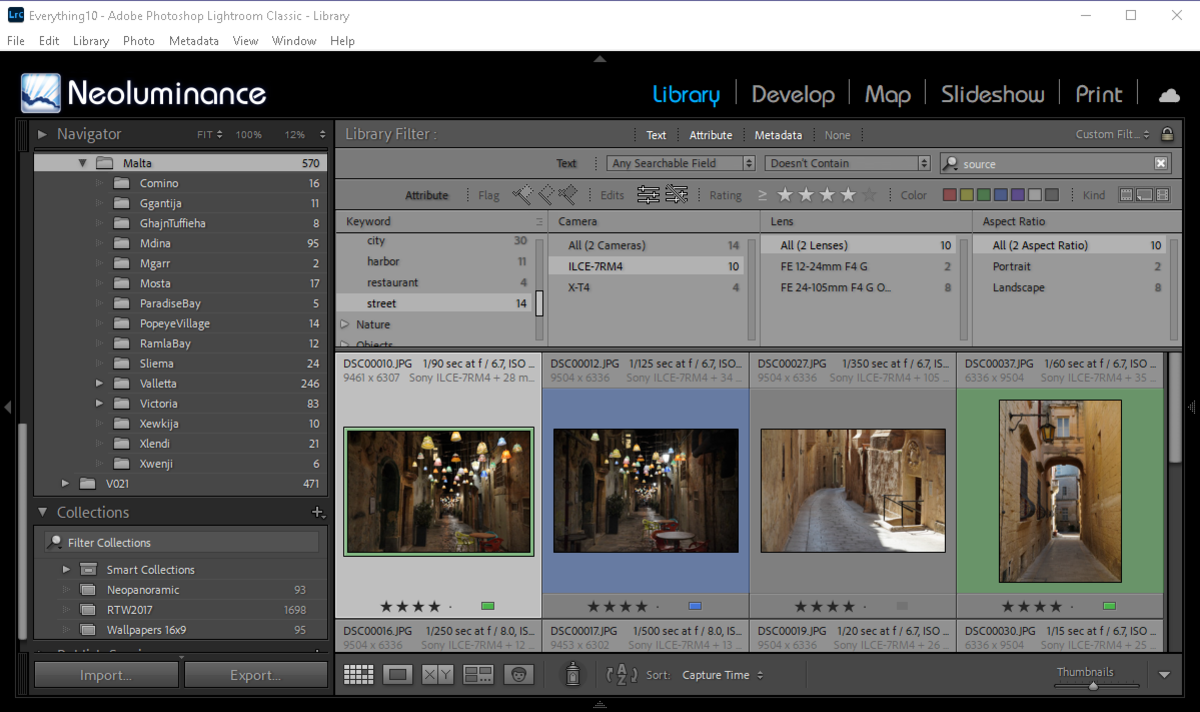
Metadata filtering is highly capable. Lightroom 10.1 provides 31 searchable metadata tag. Upon selecting a tag, Lightroom show all its possible values for files in the currently chosen hierarchy. Each value shows a counter of how many files it matches. One can compound the filter by selecting a tag in a subsequent column. This automatically narrows possible values in further columns. By default, four columns are shown but more can be added or exiting ones removed.
Even though negating a value is not supported, Lightroom supports multi-selection which selects the union of results corresponding to each selected values. It is therefore possible to emulate negation by selection all values and removing the one to negate. This is slightly tedious but works well.
Among all these filtering capabilities, Lightroom falls short with Aspect Ratio. The aspect ratio filter select portrait, landscape or square images. While useful, this is not what is expected! Selecting by an actual aspect ratio such as 3:2 or 4:3 is not supported. Strangely, there is no support for searching by image resolution either.
Before filtering on anything other than file system or EXIF, metadata must be added. Keywording is performed using a simple interface where one can add new keywords instantly, choose from recently used ones and see which keyword is already applied or partially applied to the current selection. Frequently adding related keywords is a breeze since the application creates buttons for the recently keywords in order to efficiently apply without typos.
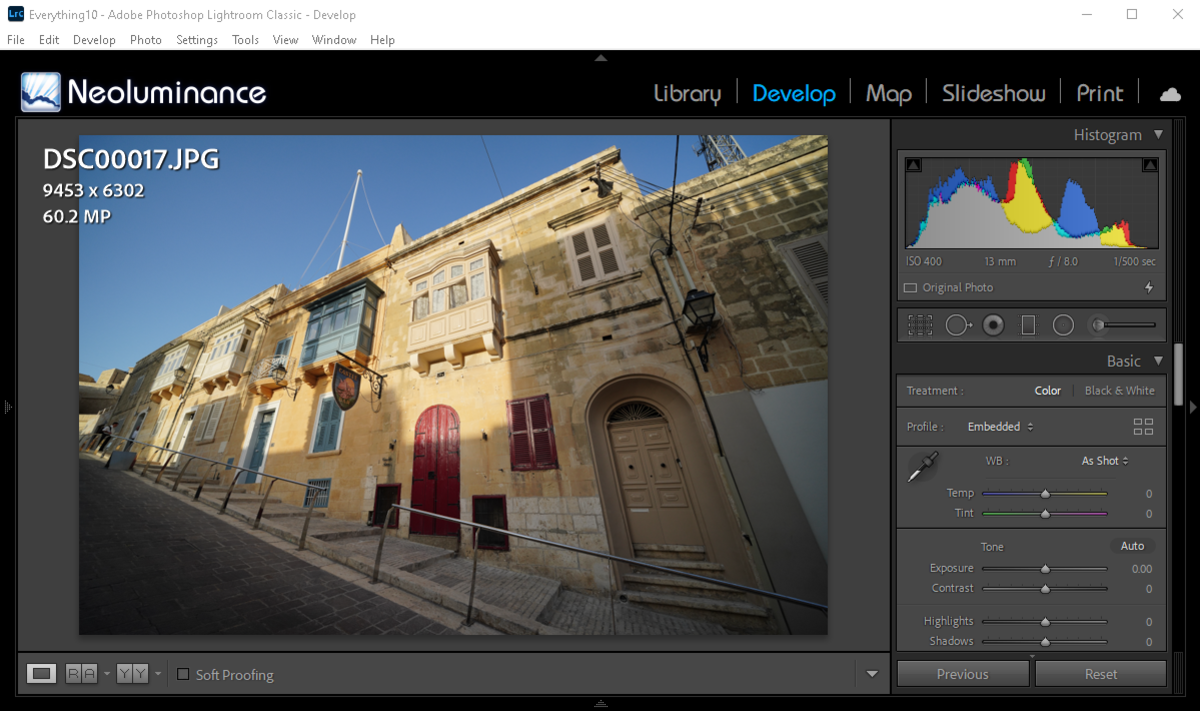
Image Viewing & Processing
The Develop module is built around a sophisticated viewer. There is also a similar viewer in the Library module with fewer options but they both operate the same way. Images can be shown from 6% to 1600% of the 1:1 pixel view. There are automatic zoom-to-fit and zoom-to-fill levels. An optional slider below the image controls the zoom level, which is also possible by using CTRL +/- or by rotating the scroll wheel while holding down the CTRL key. These inputs all set zoom relative the pixels. Unusually, clicking on an image toggles between enable zoom-to-fit or zoom-to-fill and the previous zoom level. It is unfortunate that the scroll wheel alone does not zoom and that no shortcut exists for zoom-to-fit.
Panning with the pointing device is intuitive. Just hold the left mouse button down and drag. Using the keyboard panning is done with the cursor keys while holding down the ALT button. Again, this is more effort than necessary. Oddly, the scroll wheel alone pans vertically and even those with a tilting wheel can only scroll up and down. With the rest of the user-interface so well designed, its baffling that viewing controls are so inn efficient.
The Adobe Lightroom Classic viewer offers additional viewing modes. One is Reference mode which keeps an image fixed in half the viewer. This is really useful when trying to match processing results. The other is Before & After that shows the input and output of image processing. This can appear as two side-by-side viewers or as one viewer split halfway, showing one half before processing and the other after.
Image processing is incredibly easy and efficient in Lightroom. Most processing functions are controlled by simple sliders with a preset range. Processing happens immediately when a slider is dragged away from its default zero position. Double clicking on any slider resets it which essentially turns of that particular tool. A numeric value showing the exact amount applied can be changed with the keyboard for precise adjustments.
Changes to an image are instantly shown in the viewer. The histogram at the top of the processing tool panel is genius! While it shows the color distribution in all RGBCMYL components, it also indicates which channel is clipped by lighting up arrows on either side of the histogram. Clicking on one of these arrows overlays where channels are clipped. The secret weapon of Lightroom image processing is that sections of the histogram can be dragged to adjust Blacks, Shadows, Exposure, Highlights and Whites.
The Lightroom histogram packs several image processing functions inside an effective visualization tool to control image tonality.
Right below the histogram, there is row of icons for the Crop Tool plus all local adjustments. These tools are extremely well thought-out and offer visual aids and various options with sensible defaults. This is certainly the most direct and intuitive way to manipulate images.
Performance
Importing images is required before working with them which gives Lightroom the opportunity to prepare proxies. These lower resolution version of images speed up response time but must be generated first. With the prepared 25GB of images, Lightroom took just over 6 minutes to import 619 out of 620 files. Although it managed to import a mix of JPEG and RAW files, Lightroom issued a message saying that it could not import an image of more than 512 megapixels.
Once import complete, Lightroom is impressively quick. Adding metadata is nearly instantaneous and filtering happens very quickly. When viewing a huge set of images, some thumbnails take a while to appear but the remainder of the interface stays responsive. The viewer loads images really quickly but there is a 2-3 second delay for its to refresh at the resolution of the display. Zooming is really fast except for ultra-high resolution images. Most out-of-camera images can switch from zoom-to-fit to 100% in less than ½s.
Image processing generally happens extremely fast. Every global processing tool shows adjustments in real-time, while local corrects can take a few seconds. Things slow down when layering an effect using the gradient tool. There is a limit to how much processing can be performed and Lightroom really seems to be pushing against that limit.
Conclusion
Adobe Lightroom Classic truly lives up to expectations and sets a high bar for any competitor. Its sleek and modern user interface is well-match to the digital photography workflow with features spanning organization to processing and publication. The interface is nicely polished with exception to viewer inefficiencies mentioned above in this review.
There is an extensive feature set in Lightroom that remains globally unmatched. Its search features are quite capable but certainly have gaps compared to more advanced DAM software. The lack of proper aspect-ratio filtering and searching by resolution is disappointing for version 10! Negating search criteria is also minimal. Still, Lightroom searches quickly with an intuitive interface.
Image processing features are plentiful and cover all common ways of tuning photographs. With controls that translate well into photography concepts, Lightroom really shines in its digital interpretation of a darkroom. Its tools are carefully selected to correct typical issues with the exposure, camera, lens and even the photographer! When it comes to speed, Lightroom turns in a solid if somewhat uneven performance. There are a few moments when the user must wait briefly but most operations are quick.

 Next
Next Software Reviews
Please Support Neocamera
All information on Neocamera is provided free of charge yet running this website is a huge endeavor. Purchases made via affiliate links found throughout the site help keep it running and up-to-date. There is no additional cost to you, so please consider buying via these links to our affilates:




Thank you for your support!


Updates
2026.05.21

Laowa 4.5-10mm F/2.8 Fisheye Zoom Lens Review
In-depth review of the Venus Optics Laowa 4.5-10mm F/2.8 Fisheye Zoom Lens. This lens zooms from a circular to rectangular fisheye with an 180° viewing angle. This review analyses its optical quality, construction and handling.
2026.04.13

Laowa 17mm F/4 Zero-D Shift Review
In-Depth review of the Venus Optics Laowa 17mm F/4 Zero-D Shift Lens. This ultra-wide Shift lens is specifically designed for Mirrorless Digital Cameras and is available in 4 Full-Frame mounts plus 2 Medium-Format ones.
2025.11.13

Best Gifts for Photographers in 2025 by Budget
The annual Neocamera Photography Gift Guide updated to 2025. Find great gifts for photographers with any price budget.
2025.07.07

Stellar Photo Recovery Review
Review of Stellar Photo Recovery V12. This Windows and MacOS software can recover photos and videos in a huge number of formats from memory cards, USB drives, SSDs and HHDs.
2025.05.14

Huion Kamvas 13 Gen 3 Review
In-Depth review of the Huion Kamvas 13 Gen 3 Pen Display Tablet for photographers and graphic artists.
2025.01.18

Fujifilm GFX 2025 Lens Roundup
Lens Review roundup of Fujifilm GFX Medium-Format lenses. Quality, performance and handling of the GF20-35mm F/4R WR, GF30mm F/3.5 Tilt-Shift and the GF55mm F/1.7.
2024.11.18

Best 2024 Photography Gifts for Every Budget
Great gifts for photographers and photo enthusiasts selected for every budget among the best products of 2024.
2024.08.07

Eye Protection Tips for Professional Photographers
The four main considerations for professional photographers regarding eyewear.
2024.07.14

Fujifilm X100VI Review
Flagship fixed-lens compact digital camera with a 40 MP sensor and Image-Stabilization, a first for the series. Retro design featuring dual control-dials, plus direct ISO, Shutter-Speed and EC dials. Its hybrid viewfinder can switch between EVF and OVF mode.
2024.05.09

Fujifilm GFX100 II Review
Flagship 102 Megapixels Medium-Format Mirrorless Digital Camera with 8-Stop 5-Axis IBIS, 8 FPS Drive, 8K Video and 400 MP Super-Resolution capture in a weatherproof and freezeproof body with dual control-dials and dual memory-card slots.
2024.04.03

Fujifilm X-T5 Review
Newest Fujifilm flagship boasting a 40 MP APS-C sensor, 5-axis IBIS with 7-stop efficiency, 15 FPS continuous drive, 6.2K Video capture, dual control-dials and dual SDXC UHS-II slots in a sturdy weatherproof and freezeproof body.
2023.11.20

Best Digital Cameras of 2023
Find out which are the Best Digital Cameras of 2023. All the new Mirrorless Digital Cameras from entry-level to high-end professional.
2026.05.21
2026.04.13
2025.11.13
2025.07.07
2025.05.14
2025.01.18
2024.11.18
2024.08.07
2024.07.14
2024.05.09
2024.04.03
2023.11.20
Camera Bag


Your camera bag is empty. To add a camera or lens click on the star next to its name.
Your camera bag is empty.
Add cameras or lenses by clicking on the star next to their name.
NEWS
2026.05.13

Sony Levels Up 6th Generation Alpha A7R
Digital Camera
2026.05.13
Canon Launches First Full-Frame Video Mirrorless
Digital Camera
2026.05.12
Panasonic Finally Launches LX100 II Successor
Digital Camera
2026.03.24
Panasonic Launches ZS300 Compact Ultra-Zoom
Digital Camera
2026.03.10

Venus Optics Unveils Ultra Wide Perspective Control Lens Duo
Lens
2026.02.24
Nikon Release Lighter Bright Constant-Aperture Full-Frame Telephoto Zoom Lens
Lens
2026.02.05
Canon Introduces 2 Extreme Wide Full-Frame Lenses
Lens
2026.01.06
Nikon Introduces Lightweight Full-Frame Zoom Lens
Lens
2025.12.02
Sony Upgrades Alpha 7 to 5th Generation
Digital Camera ○ Lens
2025.11.29
Venus Optics Releases New Zero-D Tilt-Shift Macro Lens
Lens
2025.11.23
Best Digital Cameras of 2025
Digital Camera
2025.11.14

Photography Gift Guide 2025 Edition

