Camera Basics
 Camera Choosing
 Camera Models
 Camera Buying
 DSLR Buying

Fujifilm Finepix S9000 Review
 9 Megapixels
 Ultra-Zoom: At least 10X optical zoom.
 Electronic View Finder
 VGA Video: 640 x 480 or more but less than 1280 x 720.
 Manual Controls: Both fully-manual (M) and semi-automatic modes (T and V).
 Custom White-Balance: Specifies exactly what should be white to the camera.
 Action Photography: Shutter speeds of 1/1500 or more.
 Night Photography: Reaches shutter-speeds longer than 4 seconds.
 Hotshoe: Allows external flash units to be attached.
 Spot Metering
 Runs on standard AA batteries
 Accepts Compact Flash memory.
 Accepts xD memory.
 Neocamera detailed review
 Discontinued: No longer produced by the manufacturer. May still be in stock or found used.
 1 - Capability2 - Usability3 - Performance
Fujifilm Finepix S9000 Introduction
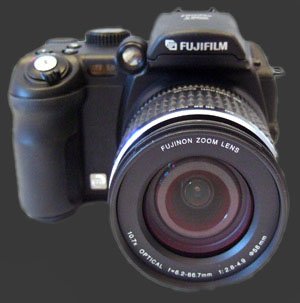 The Fuji Finepix S9000 is a large high-end fixed lens digital camera aimed at
the prosumer. It is an SLR-styled camera with complete manual controls,
a mechanical lens and numerous buttons to give it a professional feel. This
camera's outstanding feature set includes:
The Fuji Finepix S9000 is a large high-end fixed lens digital camera aimed at
the prosumer. It is an SLR-styled camera with complete manual controls,
a mechanical lens and numerous buttons to give it a professional feel. This
camera's outstanding feature set includes:
- 9 Megapixel sensor
- 10.7X Optical zoom lens
- Wide angle starting at 28 mm
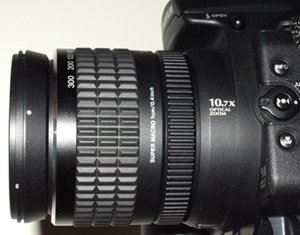
- Mechanical zoom ring
- Electronic focus ring
- Large range of ISO sensitivities (80-1600)
- Shutter speeds from 1/4000s to 30s
- Complete set of manual controls
- Unlimited high-quality movie recording
- AA Batteries
Fujifilm Finepix S9000 Suitability - What is it good for?
The Fuji Finepix S9000 is designed for a various types of photography. However, it is not designed for portability since it is the size of a small DSLRLike the Canon Digital Rebel/Rebel XT and the Pentax *ist DS/DL/DS2. The S9000 feels completely sturdy and well built. Even the moveable LCD and the memory card door feel sturdier than average. Since it weighs 755 gIncluding batteries and xD card, it feels more like a professional tool. The camera can be held securely thanks to its large rubberized grip with a horizontal indentation for the index finger and a vertical indentation for the lower fingers. On the back side of the camera, a small textured protrusion prevents the thumb from slipping to the side.
Pictures from the S9000 can be printed nicely in large size up to 17"x13" thanks to its high quality 9 megapixel Fuji SuperCCD HR sensor. The optical zoom lens starts at 28 mm, which is a moderate wide angle, and goes all the way to 300 mm which is a respectable telephoto. Near the wide-angle end, the lens can focus as close as 1 cm in super-macro mode. This makes the S9000 suitable for most photography subjects including architecture, wildlife and macro.
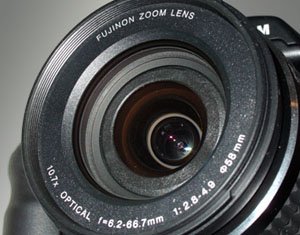
Since the S9000 provides ISO settings from 80 to 1600 and shutter-speeds from 1/4000th of a second to 30 seconds, it can be used for a vast range of photographic conditions and creativity. Indoor and social occasions can be captured well using the high-ISO settings, while low-light photography can be captured using the slow shutter-speeds available. Even indoor sports can be photographed using fast shutter speeds and high-ISO settings available with this camera. Other lighting conditions can be helped by using the S9000's powerful built-in flash or an external flash attached to the camera's hot-shoe or well-hidden sync-port.
Like no other current camera in its class, the Fuji S9000 is powered by inexpensive AA batteries which makes powering the camera inexpensive and versatile. Using 4 AA batteries2500mh, its battery life is above average. It is cheap to get extra batteries and, in case you ran out unexpectedly, you can always use readily-available disposable AA batteries. Storage options are also versatile with both Compact Flash Type I and Type II and xD cards supported. Since Compact Flash cards are cheaper, faster (See out Memory Performance feature) and available in larger sizes than xD, we recommend people who don't already have memory cards of either type to buy Compact Flash cards for the Fuji S9000. However, owners of xD cards shouldn't worry as the performance of the S9000 does not seem to be affected by the performance of memory cards.
Fujifilm Finepix S9000 Capability - What can it do?
Beyond taking pictures in a large variety of conditions suitable for large prints, the Fuji Finepix S9000 packs some useful and interesting features. Below is a list of its most useful features, followed by explanations, when required.
- Metering modes: evaluativeAlso called segment or matrix, spot and average.
- Focus control: single auto focus, continuous auto focus, manual focus.
- Auto focus modes: center, multi-pointCamera chooses a point to focus on, areaUser selects an area to focus on.
- Exposure compensation: +2 to -2 EV, in 1/3 stop increments.
- Flash modes: off, auto, redeye, off, slow-syncAlso called rear-curtain sync, slow-sync with redeye.
- Drive modes: single frame, first 4-frames, 3-frame bracket, final 4-frames, long period.
- Photography modes: fully automatic, program automatic, shutter priority, aperture priority, manual, anti-blurAlso called fast-shutter, natural lightAlso called no-flash, portrait, landscape and night.
- Other: Auto exposure lock or toggle, focus check, image playback with deletion, pan, zoom, rotation and trimming.
- Multiple exposure.
Most features are pretty common for this type of camera. The first things that require explanations are the drive modes. Obviously, in single frame mode, the camera takes a single picture when the shutter is pressed down. The first 4-frames mode is the typical burst mode where the camera focuses once, takes 4 picturesMetering for each one. As the name suggest, it takes up to 4 frames. It does so at 1.5 FPS, and shows a brief review of each picture after its taken. Then, the 3-frame bracket is standard bracketing which produces one properly exposed frame, one underexposed and one overexposed. The increments are selectable to 1/3 EV, 2/3 EV or 1 EV. The final 4-frames drive-mode is a fantastic Fuji invention which has made it into many Fuji digital cameras and several models from other manufacturers. Basically, the camera takes pictures continuously at 1.5 FPS but only saves the last 4 frames taken. This is a very valuable feature for action shots when it is difficult to anticipate the action. Finally, the long period drive mode takes pictures at roughly 1 FPS for up to 40 images. Most photography modes and scene modes are also typical. The natural light mode is basically a flash-off mode which is locked with automatic ISO selectionBetween 80 and 1600.
The AE-L button either locks the exposure while it is pressed or sets it until the AE-L button is pressed again. The specific operation of this button depends on an obscure menu which chooses between AE-L 1 and AE-L 2. The Focus-Check button magnifies the center of the live-preview, to facilitate manual focusing or validating the auto-focus. Unfortunately, neither the LCD nor EVF is precise enough to make this entirely accurate.
The multiple-exposure feature is unique to Fuji S-series digital cameras except for some film cameras. Multiple exposure allows pictures to be taken on top of each other. This is just like taking a series of pictures without advancing the film. The main difference is that, since this is the digital era, we can undo the last exposure. Fuji implemented a simple system where each time a picture is taken, the resulting multiple-exposure is previewed. The preview screen allows the photographer to either accept the last shot or discard it. This makes multiple exposures much easier than with traditional film cameras since the result can be undone and redone until it is satisfactory. Of course in the digital era, we can produce the same effect using imaging software such as Photoshop. Undeniably though, the result will be different as a result of the difference in work flow. With in-camera multiple exposure, we can reshoot on location until satisfied. With a software, the pictures have to be correct in advance unless you are willing to return on location.
 |


|
 Next1 - Capability2 - Usability3 - Performance
Please Support Neocamera
All information on Neocamera is provided free of charge yet running this website is a huge endeavor. Purchases made via affiliate links found throughout the site help keep it running and up-to-date. There is no additional cost to you, so please consider buying via these links to our affilates:




Thank you for your support!


Fujifilm S9000 Highlights


 Large digital camera
Sensor-Size: 8 x 6mm

Actual size when viewed at 100 DPI
| 9 Megapixels Ultra Zoom | ISO 80-1600 |
| 10.7X Mechanically Linked Wide Optical Zoom | Shutter 1/4000-30s |
| 0.44" Built-in EVF 240K Pixels | Full manual controls, including Manual Focus |
| 1.5 FPS Drive, 4 Images | Custom white-balance |
| 640x480 @ 30 FPS Video Recording | Spot-Metering |
| 1.8" LCD 118K Pixels | Hot-Shoe |
| Standard AA Battery | |
| Compact Flash, xD |
Camera Bag


Your camera bag is empty. To add a camera or lens click on the star next to its name.
Your camera bag is empty.
Add cameras or lenses by clicking on the star next to their name.
Updates
2026.09.08

The Wild Magic of Iceland Book Review
Review of The Wild Magic of Iceland by Norris Niman. A photographic journey through seasons.
2026.07.31

ZY Optics Pittura 30mm F/2.4 Medium-Format Lens Review
The ZY Optics Pittura 30mm F/2.4 is a manual lens designed exclusively for Medium-Format Digital Cameras. This fast prime lens captures a wide field-of-view, equivalent to a 24mm on Full-Frame. It is am affordable alternative to first-part GFX and XCD lenses.
2026.07.26

Fujifilm GFX100S II Review
Express review of the Fujifilm GFX100S II. This 102 MP Medium-Format Mirrorless Digital Camera packs an 5-Axis 8-Stop IBIS and a 5.8 MP 0.5" EVF showing 100% coverage at an extra-large 0.84X magnification. It is a more compact version of the flagship GFX100 II. This review covers exactly how these camera compare.
2026.07.14

Sony Alpha A7R VI Review
Extended In-Depth Review of the Sony Alpha A7R VI. This flagship Full-Frame Mirrorless Digital Camera combines ultra-high 67 MP resolution with very fast 30 FPS continuous shooting. It packs a 5-axis 8½-stop IBIS mechanism and an ultra-sensitive 759-Point Phase-Detect AF system. Its incredibly sharp 9.4 MP 0.64" EVF has a huge 0.9X magnification, 100% coverage, 10-bit HDR and 100% DCI-P3 color-space. Captures 8K video at 30 FPS or 4K video at 120 FPS.
2026.05.21

Laowa 4.5-10mm F/2.8 Fisheye Zoom Lens Review
In-depth review of the Venus Optics Laowa 4.5-10mm F/2.8 Fisheye Zoom Lens. This lens zooms from a circular to rectangular fisheye with an 180° viewing angle. This review analyses its optical quality, construction and handling.
2026.04.13

Laowa 17mm F/4 Zero-D Shift Review
In-Depth review of the Venus Optics Laowa 17mm F/4 Zero-D Shift Lens. This ultra-wide Shift lens is specifically designed for Mirrorless Digital Cameras and is available in 4 Full-Frame mounts plus 2 Medium-Format ones.
2025.11.13

Best Gifts for Photographers in 2025 by Budget
The annual Neocamera Photography Gift Guide updated to 2025. Find great gifts for photographers with any price budget.
2025.07.07

Stellar Photo Recovery Review
Review of Stellar Photo Recovery V12. This Windows and MacOS software can recover photos and videos in a huge number of formats from memory cards, USB drives, SSDs and HHDs.
2025.05.14

Huion Kamvas 13 Gen 3 Review
In-Depth review of the Huion Kamvas 13 Gen 3 Pen Display Tablet for photographers and graphic artists.
2025.01.18

Fujifilm GFX 2025 Lens Roundup
Lens Review roundup of Fujifilm GFX Medium-Format lenses. Quality, performance and handling of the GF20-35mm F/4R WR, GF30mm F/3.5 Tilt-Shift and the GF55mm F/1.7.
2024.11.18

Best 2024 Photography Gifts for Every Budget
Great gifts for photographers and photo enthusiasts selected for every budget among the best products of 2024.
2024.08.07

Eye Protection Tips for Professional Photographers
The four main considerations for professional photographers regarding eyewear.
2026.09.08
2026.07.31
2026.07.26
2026.07.14
2026.05.21
2026.04.13
2025.11.13
2025.07.07
2025.05.14
2025.01.18
2024.11.18
2024.08.07