Camera Basics
 Camera Choosing
 Camera Models
 Camera Buying
 DSLR Buying

Pentax Optio X70 Review
 12 Megapixels
 Ultra-Zoom: At least 10X optical zoom.
 Electronic View Finder
 Stabilization: Compensates for tiny involuntary movements of the camera.
 720p HD Video: 1280 x 720 resolution or more but less than 1920 x 1080.
 Manual Controls: Both fully-manual (M) and semi-automatic modes (T and V).
 Custom White-Balance: Specifies exactly what should be white to the camera.
 Action Photography: Shutter speeds of 1/1500 or more.
 Spot Metering
 Accepts Secure Digital High Capacity (SDHC) and SD memory.
 Neocamera detailed review
 Discontinued: No longer produced by the manufacturer. May still be in stock or found used.
 1 - Capability2 - Usability3 - Performance
Pentax Optio X70 Introduction
The Pentax Optio X70 is a full-featured ultra-zoom with a 24X very wide-angle zoom going from 26mm to 624mm and basic manual controls. Additionally it shoots HD 720p video, making it one of the few modern ultra-zooms to do so.
Most remaining features of the X70 are now standard fare for ultra-zooms models with manual controls:
- 12 Megapixels sensor
- 24X Wide-angle optical zoom lens
- Optical image stabilization
- ISO 64-1600 at full-resolution
- ISO 3200-6400 at 5 megapixels
- Shutter speeds from 1/4000s to 4s
- Manual controls including manual focus
- Automatic, preset and custom white-balance
- Exposure bracketing, 3 frames, 1/3..2 EV steps in 1/3 EV steps
- 1280x720 @ 15 FPS HD 16:9 widescreen movie-recording
- Digital wide function and in-camera panorama stitching
- Blink detection and smile capture
- Automatic highlight correction
- 2.7" LCD with 230K pixels
- EVF with 200K pixels
Pentax Optio X70 Suitability - What is it good for?
The Pentax Optio X70 is highly versatile due to its 24X optical zoom which starts at a very wide-angle 26mm and reaches 624mm, in 35mm equivalent terms. This wide range covers most photographic uses, particularly well in the telephoto range for wildlife and bird photography. This super-long reach puts the X70 even beyond the reach of DSLR lenses under $1000 USD. Macro photography is also possible with the Pentax Optio X70 which can focus as close as 1cm (0.4").
Additional ultra-wide flexibility is provided by a digital wide function which blends two portrait images into an image with a field-of-view equivalent to a 20mm lens on a 35mm film or full-frame digital camera. The stitching makes it not entirely rectilinear but its not fisheye either. This results in a 5 megapixels image. Note that the same thing is doable by computer using a program like Autostitch but with user control and more opportunity for trial-and-error, as the X70 does not preserve the source images when attempting to stitch. The same is true of its panorama mode.

The Pentax Optio X70 also features full-manual controls for creative and versatile exposures. With a shutter-speed range from 1/4000 to 4s, this digital camera can in theory handle action but unfortunately not low-light photography. The limiting factors here are noise and speed of the camera. Regardless of the level of performance described on the next review page, it is to be expected that this is where a camera like this one mostly trails digital SLRs.
The X70 is reasonably compact relative to the reach of its lens. Its moderate size means that it is easy to carry such a powerful zoom and shoot rather discretely with it. Size is key to versatility simply because a smaller camera gets taken to more places.
With a 12 megapixels sensor, images from the Optio X70 are suitable for relatively large prints, up to 24"x18" when ISO is kept low. Any computer display or web-use will not be a problem.
Storage and power options for this digital camera are rather typical of ultra-zooms. The X70 supports SD-HC cards which always means SD too. it is powered by a small proprietary lithium-ion battery.
Pentax Optio X70 Capability - What can it do?
As an ultra-zoom, most of the flexibility comes from the X70's huge zoom range. Like most ultra-zooms, this digital camera is equipped with a number of advanced features. Below is a list of its most useful features, followed by explanations, when required.
- Program exposure with shift, shutter-priority, aperture priority and manual exposure
- Metering: multi-segment, center-weighed and spot
- Exposure compensation: +2 to -2 EV, in 1/3 stop increments
- Flash compensation: +2 to -2 EV, in 1/3 stop increments
- ISO selectable from 100 to 1600 at full-resolution
- ISO 3200 and 6400 at 5 megapixels
- Selectable maximum Auto-ISO, 200 to 1600
- White-balance: Auto, 6 presets and custom
- Flash: Auto, off, on, auto-redeye, forced-redeye, slow-sync and slow-sync plus redeye
- Focus mode: Normal, macro, 1cm macro, infinity, manual-distance and manual-point selection
- Automatic selection of macro mode
- Focus area: center, wide or continuous tracking
- Drive: Single-shot, 3-speed continuous, self-timer, exposure bracket and internal shooting
- Exposure bracket: 3 shots, 1/3 to 2 EV, in 1/3 stop increments
- Self-timer: 12s or 2s
- Automatic highlight correction
- Custom image parameters: 3 color modes, contrast, sharpness and saturation settings
- Camera power-off memory settings
- Shake reduction
- Face-priority
- Smile-capture
- Blink detection
- Digital wide function
- Automatic panorama stitching
The automatic macro setting lets the Pentax X70 enter macro mode without changing focus modes. Selecting 1cm macro mode zooms-in automatically to the right focal-length needed. Highlight correction uses a different tone-curve to reduce chances of having clipped highlights.
In smile capture mode, the camera takes a picture when a smile is detected, no need to press the shutter-release. Blink detection simply warns if the camera detects that someone may have blinked in the last picture taken. The interval timer feature shoots up to 408 images. The time between shots can range from 10 seconds to 99 minutes. A start delay between 1 minute and 24 hours can also be set.
The digital wide function and automatic panorama use the camera to stitch low-resolution panoramas of either 2 portrait or 3 landscape images.
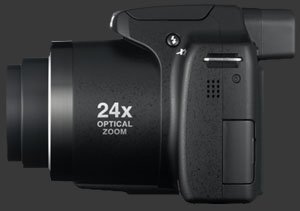
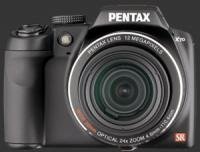
The Pentax 24X optical zoom lens of this digital camera has a wide range from 26mm to 624mm in 35mm terms. This is 2mm wider than what is considered wide-angle and reaches well into the telephoto range used for wildlife photography and birding. The exact same range is found on the Nikon Coolpix P90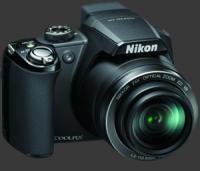
Nikon Coolpix P90 and Kodak Z980. Olympus does slightly more with its 26X zoom, starting at 26mm but reaching 676mm.
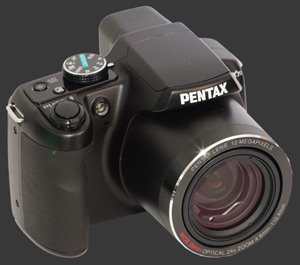
Shake Reduction is Pentax's image stabilization. which compensates for involuntary camera movements, up to 3 stops compared to no stabilization. This helps with the usability of such a long zoom. Recall that the rule-of-thumb is to shoot at 1 over the focal-length. Thus, at the 624mm end, shooting at 1/750s is expected for shots to come out sharp. Considering the maximum aperture is F5 at 624mm and the desire to use low ISO settings, a shutter-speed of 1/750s can be difficult. With stabilization, this requirements is reduced to 1/200s or even 1/100s. In movie-mode, Shake Reduction is not available. Instead, stabilization is digitally simulated. In order to do so, the X70 has to reduce the field-view of the lens, thus losing some wide-angle coverage.
 |


|
 Next1 - Capability2 - Usability3 - Performance
Please Support Neocamera
All information on Neocamera is provided free of charge yet running this website is a huge endeavor. Purchases made via affiliate links found throughout the site help keep it running and up-to-date. There is no additional cost to you, so please consider buying via these links to our affilates:




Thank you for your support!


Pentax X70 Highlights


 Large digital camera
Sensor-Size: 6 x 5mm

Actual size when viewed at 100 DPI
| 12 Megapixels Ultra Zoom | ISO 50-1600 |
| 24X Wide Optical Zoom | Shutter 1/4000-4s |
| Built-in Stabilization | Full manual controls, including Manual Focus |
| 0.20" Built-in EVF 200K Pixels | Custom white-balance |
| 1.2 FPS Drive, 6 Images | Spot-Metering |
| 1280x720 @ 30 FPS Video Recording | Lithium-Ion Battery |
| 2.7" LCD 230K Pixels | Secure Digital High Capacity |
Camera Bag


Your camera bag is empty. To add a camera or lens click on the star next to its name.
Your camera bag is empty.
Add cameras or lenses by clicking on the star next to their name.
Updates
2025.11.13

Best Gifts for Photographers in 2025 by Budget
The annual Neocamera Photography Gift Guide updated to 2025. Find great gifts for photographers with any price budget.
2025.07.07

Stellar Photo Recovery Review
Review of Stellar Photo Recovery V12. This Windows and MacOS software can recover photos and videos in a huge number of formats from memory cards, USB drives, SSDs and HHDs.
2025.05.14

Huion Kamvas 13 Gen 3 Review
In-Depth review of the Huion Kamvas 13 Gen 3 Pen Display Tablet for photographers and graphic artists.
2025.01.18

Fujifilm GFX 2025 Lens Roundup
Lens Review roundup of Fujifilm GFX Medium-Format lenses. Quality, performance and handling of the GF20-35mm F/4R WR, GF30mm F/3.5 Tilt-Shift and the GF55mm F/1.7.
2024.11.18

Best 2024 Photography Gifts for Every Budget
Great gifts for photographers and photo enthusiasts selected for every budget among the best products of 2024.
2024.08.07

Eye Protection Tips for Professional Photographers
The four main considerations for professional photographers regarding eyewear.
2024.07.14

Fujifilm X100VI Review
Flagship fixed-lens compact digital camera with a 40 MP sensor and Image-Stabilization, a first for the series. Retro design featuring dual control-dials, plus direct ISO, Shutter-Speed and EC dials. Its hybrid viewfinder can switch between EVF and OVF mode.
2024.05.09

Fujifilm GFX100 II Review
Flagship 102 Megapixels Medium-Format Mirrorless Digital Camera with 8-Stop 5-Axis IBIS, 8 FPS Drive, 8K Video and 400 MP Super-Resolution capture in a weatherproof and freezeproof body with dual control-dials and dual memory-card slots.
2024.04.03

Fujifilm X-T5 Review
Newest Fujifilm flagship boasting a 40 MP APS-C sensor, 5-axis IBIS with 7-stop efficiency, 15 FPS continuous drive, 6.2K Video capture, dual control-dials and dual SDXC UHS-II slots in a sturdy weatherproof and freezeproof body.
2023.11.20

Best Digital Cameras of 2023
Find out which are the Best Digital Cameras of 2023. All the new Mirrorless Digital Cameras from entry-level to high-end professional.
2023.07.10

Fujifilm X-H2 Review
40 Megapixels APS-C Hybrid Mirrorless Digital Camera with 7-stop IBIS. Fastest shutter ever and 8K video capture. Large builtin EVF with 0.8X magnification and 5.8 MP, plus an Eye-Start Sensor. Packed with features and large number of controls in a weatherproof and freezeproof body.
2023.05.07

Sony FE 20-70mm F/4G Review
Review of the unique Sony FE 20-70mm F/4G lens. The optical zoom of this lens spans ultra-wide-angle and medium focal-length coverage, making it one of the most versatile Full-Frame lenses on the market.
2025.11.13
2025.07.07
2025.05.14
2025.01.18
2024.11.18
2024.08.07
2024.07.14
2024.05.09
2024.04.03
2023.11.20
2023.07.10
2023.05.07