



 Camera Basics
 Camera Choosing
 Camera Models
 Camera Buying
 DSLR Buying

Pentax K-7 Samples
 15 Megapixels
 Single Lens Reflex
 Stabilization: Compensates for tiny involuntary movements of the camera.
 Automatic Level: Corrects for some degree of tilt to keep the horizon level.
 Continuous Drive
 720p HD Video: 1280 x 720 resolution or more but less than 1920 x 1080.
 Manual Controls: Both fully-manual (M) and semi-automatic modes (T and V).
 Custom White-Balance: Specifies exactly what should be white to the camera.
 Action Photography: Shutter speeds of 1/1500 or more.
 Night Photography: Reaches shutter-speeds longer than 4 seconds.
 Hotshoe: Allows external flash units to be attached.
 Spot Metering
 Depth-Of-Field Preview: Improve perception of DOF before shooting.
 Weatherproof - Seals protect from dust, humidity and light splashing.
 Accepts Secure Digital High Capacity (SDHC) and SD memory.
 Neocamera detailed review
 Discontinued: No longer produced by the manufacturer. May still be in stock or found used.
 1 - Images & Video2 - Indoor Crops3 - Outdoor Crops4 - Sharpness Settings
Pentax K-7 Sharpness Settings
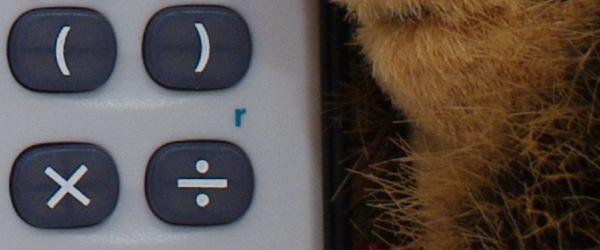
The Pentax K-7 has an unprecedented number of sharpness settings. Initially, there were 18 settings but version 1.02 of the K-7 firmware adds another 9 settings. The way one chooses the setting is by selecting one of nine steps along a particular scale. There are 3 scales now: Sharpness, Fine Sharpness and Fine Sharpness 2, each of these affecting how pixels are created from the sensor data. As usual, none of these settings apply to PEF or DNG files. Differences between adjacent steps of the same scale are sublte but the difference from one to the other of a scale is very obvious. Differences between scales show up in fine details and along sharp edges. The Sharpness scale applies the strongest sharpening and therefore shows the most artifacts near its maximum. The Fine Sharpness scale emphasizes finer details, leading to less artifacts but to images that are overall less sharp. The new Fine Sharpness 2 scale tries to walk the fine line between the two. In the crops below, keep look closely at the edges for the X, for example. The Interactive images below illustrate how each scale renders details. Images are 100% crops from pictures of a porcupine hugging a calculator, to see sharpening effects on both sharp edges and fine details. No real porcupines were harmed in the production of these images. Click on the labels below to show the crop for a specific scale and level. |
 |
 |



 
|
 1 - Images & Video2 - Indoor Crops3 - Outdoor Crops4 - Sharpness Settings
Please Support Neocamera
All information on Neocamera is provided free of charge yet running this website is a huge endeavor. Purchases made via affiliate links found throughout the site help keep it running and up-to-date. There is no additional cost to you, so please consider buying via these links to our affilates:




Thank you for your support!


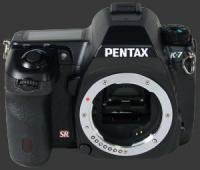
Pentax K-7 Highlights


 SLR digital camera
Sensor-Size: 24 x 16mm

Actual size when viewed at 100 DPI
| 15 Megapixels DSLR | ISO 100-6400 |
| Pentax K Mount 1.5X FLM | Shutter 1/8000-30s |
| 3-Axis Built-in Stabilization, 4-Stop Improvement | Full manual controls, including Manual Focus |
| 100% Coverage Large Viewfinder | Custom white-balance with 2 axis fine-tuning |
| Auto Horizon Correction 1 Axis Digital Level | Spot-Metering |
| Weatherproof down to -10C | Hot-Shoe & Sync-Port |
| Built-in Dust Reduction | Stereo audio input |
| 5.2 FPS Drive, 40 Images | Lithium-Ion Battery |
| 1536x1024 @ 30 FPS Video Recording | Secure Digital High Capacity |
| 3" LCD 920K Pixels |
Camera Bag


Your camera bag is empty. To add a camera or lens click on the star next to its name.
Your camera bag is empty.
Add cameras or lenses by clicking on the star next to their name.
Updates
2025.11.13

Best Gifts for Photographers in 2025 by Budget
The annual Neocamera Photography Gift Guide updated to 2025. Find great gifts for photographers with any price budget.
2025.07.07

Stellar Photo Recovery Review
Review of Stellar Photo Recovery V12. This Windows and MacOS software can recover photos and videos in a huge number of formats from memory cards, USB drives, SSDs and HHDs.
2025.05.14

Huion Kamvas 13 Gen 3 Review
In-Depth review of the Huion Kamvas 13 Gen 3 Pen Display Tablet for photographers and graphic artists.
2025.01.18

Fujifilm GFX 2025 Lens Roundup
Lens Review roundup of Fujifilm GFX Medium-Format lenses. Quality, performance and handling of the GF20-35mm F/4R WR, GF30mm F/3.5 Tilt-Shift and the GF55mm F/1.7.
2024.11.18

Best 2024 Photography Gifts for Every Budget
Great gifts for photographers and photo enthusiasts selected for every budget among the best products of 2024.
2024.08.07

Eye Protection Tips for Professional Photographers
The four main considerations for professional photographers regarding eyewear.
2024.07.14

Fujifilm X100VI Review
Flagship fixed-lens compact digital camera with a 40 MP sensor and Image-Stabilization, a first for the series. Retro design featuring dual control-dials, plus direct ISO, Shutter-Speed and EC dials. Its hybrid viewfinder can switch between EVF and OVF mode.
2024.05.09

Fujifilm GFX100 II Review
Flagship 102 Megapixels Medium-Format Mirrorless Digital Camera with 8-Stop 5-Axis IBIS, 8 FPS Drive, 8K Video and 400 MP Super-Resolution capture in a weatherproof and freezeproof body with dual control-dials and dual memory-card slots.
2024.04.03

Fujifilm X-T5 Review
Newest Fujifilm flagship boasting a 40 MP APS-C sensor, 5-axis IBIS with 7-stop efficiency, 15 FPS continuous drive, 6.2K Video capture, dual control-dials and dual SDXC UHS-II slots in a sturdy weatherproof and freezeproof body.
2023.11.20

Best Digital Cameras of 2023
Find out which are the Best Digital Cameras of 2023. All the new Mirrorless Digital Cameras from entry-level to high-end professional.
2023.07.10

Fujifilm X-H2 Review
40 Megapixels APS-C Hybrid Mirrorless Digital Camera with 7-stop IBIS. Fastest shutter ever and 8K video capture. Large builtin EVF with 0.8X magnification and 5.8 MP, plus an Eye-Start Sensor. Packed with features and large number of controls in a weatherproof and freezeproof body.
2023.05.07

Sony FE 20-70mm F/4G Review
Review of the unique Sony FE 20-70mm F/4G lens. The optical zoom of this lens spans ultra-wide-angle and medium focal-length coverage, making it one of the most versatile Full-Frame lenses on the market.

