Camera Basics
 Camera Choosing
 Camera Models
 Camera Buying
 DSLR Buying

Olympus Stylus 7010 Review
 12 Megapixels
 Stabilization: Compensates for tiny involuntary movements of the camera.
 VGA Video: 640 x 480 or more but less than 1280 x 720.
 Action Photography: Shutter speeds of 1/1500 or more.
 Spot Metering
 Accepts xD memory.
 Neocamera detailed review
 Discontinued: No longer produced by the manufacturer. May still be in stock or found used.
Olympus Stylus 7010 Introduction
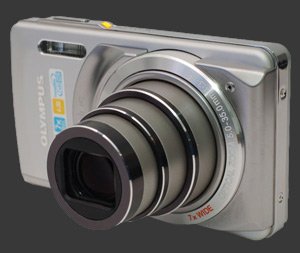
The Olympus Stylus 7010 brings a wide-angle optical zoom lens in an ultra-compact body with a pretty long reach, going from 28 to 196mm in 35mm terms. It is fitted with a 12 megapixel senor and a 2.7" LCD with 230K pixels. This is entirely point and shoot camera with very few controls but it is relatively simple to use.
| Key Features |
|---|
| 12 Megapixels sensor |
| 7X stabilized wide-angle optical zoom, equivalent to 28-196mm, F3 / 5.9-F8 |
| ISO Sensitivity from 64 to 1600 |
| Shutter-speeds from 1/2000s to 4s |
| Automatic white-balance, 6 white-balance presetsSunny, Cloudy, Incandescent, Fluorescent 1, Fluorescent 2, Fluorescent 3 |
| Evaluative and spot metering |
| Exposure compensation, -2..+2 EV, 1/3 EV steps |
| Shadow adjustment feature |
| High-speed drive at 3 megapixels, 8 or 11 FPS |
| Panorma modes with in-camera and PC stitching |
| 12 Second self-timer |
| 640x480 30 FPS Movie mode |
| 2.7" LCD 230K Pixels |
| xD and MicroSD memory supported |
| Uses a lithium-Ion battery |
Olympus Stylus 7010 Suitability - What is it good for?
The feature set of the Stylus 7010 being ultra-simple, the suitability of this digital camera revolves around its 7X stabilized wide-angle optical zoom. The bright 2.7" LCD makes it easy to see images and its HyperCrystal View technology is really effective for outdoor visibility.
It is easy to see this as a camera for family snapshots and record-keeping photographs. The slim body size and metal exterior means transporting it everywhere is not cumbersome at all.
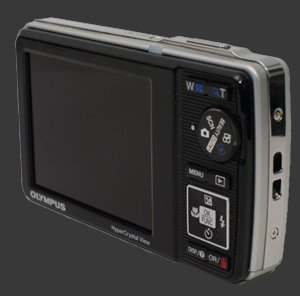
The primary weakness in the feature set is the lack of custom white-balance which will be missed in difficult lighting, although there are 7 presets. Although there is 3 continuous shooting modes, the full-resolution one shoots 2 frames at a glacial rate, making it not really continuous. Low resolution continuous drive modes on the other hand are very fast and the LCD does show a view of the subject, contrarily to many ultra-compact in continuous drive mode.
A silly thing for tripod work, which is not a concern for most people looking at this camera, is that it only has a single 12s self-timer countdown. The tripod mount is also not exactly in the center. What a pitty, considering the panorama modes are very good.
Olympus Stylus 7010 Usability - How easy is it to use?
The Olympus Stylus 7010 is quite easy to use, mostly due to its limited feature set and a well implemented Func menu system to change common settings. The camera body lacks a grip in the front and space on the back is inexistant, so the wrist-stap is a most. It is easy enough to work with.
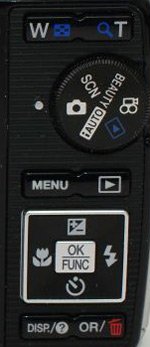
The first thing one notices after using the camera is how fast it is. With very few exceptions, it responds really quickly. Buttons are a little soft though so, the 4-way controller in particular, so accidental changes are easy to make. Also, since buttons are tightly packed, using the 7010 with gloves on is very frustrating.
The shutter-release is easy to use with a slight halfway point. The zoom rocker moves the lens quickly but in 10 steps which is too coarse for precise framing. Common features are accessible from the 4-way controller.
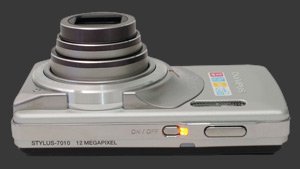
Olympus calls the screen a HyperCrystal View LCD. It uses a semi-reflective backing that lets bright light help the viewing experience. At 2.7" and 230K pixels, framing is easy and comfortable with this Stylus.
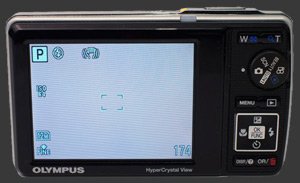
The Func button brings up a menu for changing White-Balance, ISO, Drive, Metering (Multi-Segment or Spot), image resolution and quality. The full menu system is oddly organized but since it contains few items, it is not hard to learn your way around it.
This digital camera has excellent panorama modes. Two of them stictch up to 3 images at 3 megapixels in the camera. These modes only support horizontal, left to right or right to left, stitching. One is feature based. It takes subsequent pictures automatically when some feature is matched, just be carefull of camera tilt! The other mode is more traditional as it lets the user take each image one by one with a guide for overlapping features. The last panorama mode lets you combine full-resolution images on the computer. This one has excellent flexibility as it works in all directions. This is great as panoramas stitched from portrait-oriented images have better vertical angle of view.
Olympus Stylus 7010 Conclusion
The Olympus Stylus 7010 is an interesting offering. It is a clear let-down in terms of image noise and details but for typical small prints this should not be an issue. Even the ISO 800 setting will make a nice small print. When we consider the good exposure, natural image colors and corner-to-corner sharpness, the total image quality is nice except for large prints. A lack of custom white-balance though is a problem in mixed lighting though.
The most impressive side of this digital camera is its speed. Every important aspect other than shot-to-shot speed is relatively fast. In good light, focusing speed is also quite good.
The package offered by the Olympus Stylus 7010 is one of simplicity and portability. At that it fullfills its niche. A great deal many competitord except though with wide-angle long-zoom lenses being not so uncommon now but the 7010 is the smallest camera with a 7X optical zoom that starts at wide-angle. An interesing option to consider is the Nikon Coolpix S640 which is also one fast ultra-compact.
 |



 
|

Please Support Neocamera
All information on Neocamera is provided free of charge yet running this website is a huge endeavor. Purchases made via affiliate links found throughout the site help keep it running and up-to-date. There is no additional cost to you, so please consider buying via these links to our affilates:




Thank you for your support!


Olympus 7010 Highlights
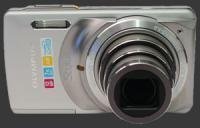


 Ultra-Compact digital camera
Sensor-Size: 6 x 5mm

Actual size when viewed at 100 DPI
| 12 Megapixels Ultra Compact | ISO 64-1600 |
| 7X Wide Optical Zoom | Shutter 1/2000-4s |
| Built-in Stabilization | Spot-Metering |
| 640x480 @ 30 FPS Video Recording | Lithium-Ion Battery |
| 2.7" LCD 230K Pixels | xD, Internal Memory |
Camera Bag


Your camera bag is empty. To add a camera or lens click on the star next to its name.
Your camera bag is empty.
Add cameras or lenses by clicking on the star next to their name.
Updates
2026.05.21

Laowa 4.5-10mm F/2.8 Fisheye Zoom Lens Review
In-depth review of the Venus Optics Laowa 4.5-10mm F/2.8 Fisheye Zoom Lens. This lens zooms from a circular to rectangular fisheye with an 180° viewing angle. This review analyses its optical quality, construction and handling.
2026.04.13

Laowa 17mm F/4 Zero-D Shift Review
In-Depth review of the Venus Optics Laowa 17mm F/4 Zero-D Shift Lens. This ultra-wide Shift lens is specifically designed for Mirrorless Digital Cameras and is available in 4 Full-Frame mounts plus 2 Medium-Format ones.
2025.11.13

Best Gifts for Photographers in 2025 by Budget
The annual Neocamera Photography Gift Guide updated to 2025. Find great gifts for photographers with any price budget.
2025.07.07

Stellar Photo Recovery Review
Review of Stellar Photo Recovery V12. This Windows and MacOS software can recover photos and videos in a huge number of formats from memory cards, USB drives, SSDs and HHDs.
2025.05.14

Huion Kamvas 13 Gen 3 Review
In-Depth review of the Huion Kamvas 13 Gen 3 Pen Display Tablet for photographers and graphic artists.
2025.01.18

Fujifilm GFX 2025 Lens Roundup
Lens Review roundup of Fujifilm GFX Medium-Format lenses. Quality, performance and handling of the GF20-35mm F/4R WR, GF30mm F/3.5 Tilt-Shift and the GF55mm F/1.7.
2024.11.18

Best 2024 Photography Gifts for Every Budget
Great gifts for photographers and photo enthusiasts selected for every budget among the best products of 2024.
2024.08.07

Eye Protection Tips for Professional Photographers
The four main considerations for professional photographers regarding eyewear.
2024.07.14

Fujifilm X100VI Review
Flagship fixed-lens compact digital camera with a 40 MP sensor and Image-Stabilization, a first for the series. Retro design featuring dual control-dials, plus direct ISO, Shutter-Speed and EC dials. Its hybrid viewfinder can switch between EVF and OVF mode.
2024.05.09

Fujifilm GFX100 II Review
Flagship 102 Megapixels Medium-Format Mirrorless Digital Camera with 8-Stop 5-Axis IBIS, 8 FPS Drive, 8K Video and 400 MP Super-Resolution capture in a weatherproof and freezeproof body with dual control-dials and dual memory-card slots.
2024.04.03

Fujifilm X-T5 Review
Newest Fujifilm flagship boasting a 40 MP APS-C sensor, 5-axis IBIS with 7-stop efficiency, 15 FPS continuous drive, 6.2K Video capture, dual control-dials and dual SDXC UHS-II slots in a sturdy weatherproof and freezeproof body.
2023.11.20

Best Digital Cameras of 2023
Find out which are the Best Digital Cameras of 2023. All the new Mirrorless Digital Cameras from entry-level to high-end professional.
2026.05.21
2026.04.13
2025.11.13
2025.07.07
2025.05.14
2025.01.18
2024.11.18
2024.08.07
2024.07.14
2024.05.09
2024.04.03
2023.11.20