Camera Basics
 Camera Choosing
 Camera Models
 Camera Buying
 DSLR Buying

Nikon Coolpix S60 Review
 10 Megapixels
 Stabilization: Compensates for tiny involuntary movements of the camera.
 VGA Video: 640 x 480 or more but less than 1280 x 720.
 Custom White-Balance: Specifies exactly what should be white to the camera.
 Action Photography: Shutter speeds of 1/1500 or more.
 Accepts Secure Digital High Capacity (SDHC) and SD memory.
 Neocamera detailed review
 Discontinued: No longer produced by the manufacturer. May still be in stock or found used.
Nikon Coolpix S60 Introduction
The Nikon Coolpix S60 is the newest and most different ultra-compact digital camera from Nikon. This relatively slim model features a non-protruding 5X optical zoom lens which starts at a slightly wider than normal 33mm and reaches to 165mm, in 35mm equivalent terms. Its headline features also include vibration reduction, a 10 megapixels sensor and a 3.5" LCD.
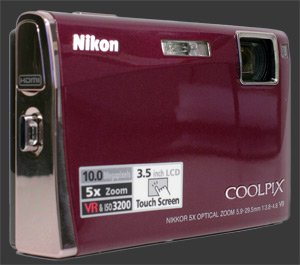
This entirely point-and-shoot model is designed around its LCD, which is not only the biggest LCD on any digital camera but also a touch-screen which serves to control it. Nearly all buttons are gone, leaving only the shutter-release and the power button. Aside from +/- 2 stops of exposure-compensation, exposure is always controlled by the camera alone. Very few other aspects of the S60 are under user-control, showing that this ultra-compact is targeted at beginners alone.
| Key Features |
|---|
| 10 Megapixels sensor |
| 5X Stabilized optical zoom, equivalent to 33-165mm |
| ISO Sensitivity from 64 to 2000 at full-resolution |
| ISO 3200 at 5 megapixels |
| Shutter-speeds from 1/1500s to 4s |
| Automatic white-balance, 5 white-balance presetsDaylight, Incandescent, Fluorescent, Cloudy and Flash and custom white-balance |
| Evaluative metering only |
| Single shot, continuous focus drive and best-shot-selection drive |
| Normal and macro focus modes |
| Center, face or manual focus point selection |
| Exposure compensation, -2..+2 EV, 1/3 EV steps |
| 0.7 FPS Continuous drive |
| Self-timer: 2s, 10s or smile-detect |
| 640x480 30 FPS Movie mode, single or continuous focus mode, electronically simulated stabilization |
| 3.5" Touch-screen LCD 230K pixels |
| 18 Scene modes |
| Integrated help system |
Nikon Coolpix S60 Suitability - What is it good for?
While this is not the smallest ultra-compact, it packs a 5X stabilized optical zoom lens into a 0.9" thick body. A few recent models such as the Sony Cybershot T500

Being a general purpose point-and-shoot camera, its feature set is rather limited and gives almost no direct controls to the photographer. Custom white-balance and focus-point-selection are the main direct controls. Note that the shutter-speed range goes from 1/1500 to 4s. This is neither quick enough for fast action, nor long enough for night photography.
There is no optical viewfinder on the Nikon S60 but its 3.5" LCD with 230,000 pixels is truly superb. Visibility is great, both outdoors and indoors. The viewing angle is good and so is the anti-reflection coating. Only the fact that this large LCD, the largest among digital cameras, is also a touch-screen forces the photographer to keep it covered in unsightly fingerprints. Although admittedly, this LCD seems more resistant to fingermarks than the typical phone LCD. This may only be an impression or an effect of the anti-reflective coating though, since we do not know how to measure this.
This Coolpix also records 640x480 30 FPS movies in single-shot or continuous focus modes. A panorama mode helps take a series of images in any direction by locking exposure and focus and disabling all settings including ISO, WB, Flash and EC.


Nikon Coolpix S60 Usability - How easy is it to use?
The Nikon S60 is in its own category when it comes to usability, this is due to its 3.5" touch-screen and its lack of physical buttons. Only the shutter and power buttons are real, every other control is displayed on the LCD. A 3.5" on a 4" camera leaves very little room on its back. The front is smooth and slippery too which means that you really must use a wrist-strap.
The power button is small but responsive. The shutter-release has a distinct halfway point for pre focusing, so it is hard to accidentally shoot without locking focus. In the cold though, using gloves with those buttons is hard but not impossible.
Since the interface here is unique, we will ramble about it more than usual. Read carefully, as we expect people to be greatly divided on it. First, the interface is a touch screen. This hot-trend in gadgets is attracting people like crazy. Second, it is a touch screen, you have to get your fingers all over it and still see your subject well in bright outdoor light.
Nikon wisely chose a touch screen with a wider aspect ratio than the camera's image ratio. This way, space on both sides of the image is put to good use. The left side column has the Record and Play mode switch plus the flash-mode, self-timer and macro indicators. Touching an indicator overlays the image with its title and several option icons. Once the overlay appears, dismissing it calls for making a selection or pressing the shutter to cancel the change. Each time an option is selected, you just put your fingers over the image area which, in the long run, reduces the LCD visibility until you clean it.
The right column has unused space at the top, since that is the only place the thumb can rest. Yes, the thumb intentionally goes over the LCD. Below that space is the vertical zoom controller. Below that is the Home button which serves as entry-point to the menu systems and camera modes. The touch screen itself is not terribly responsive. It is certainly not as sensitive as an iPhone display but it does respond to ordinary gloves, although rather poorly.
The image itself is overlayed with some information like the current ISO, resolution, focus-point, battery-level and frame-remaining counter. None of these icons respond to touch. However, clicking anywhere away from image edges selects the focus point. This has an immediate effect on metering which is heavily based on the focus point. When the focus point is manually selected this way, an icon to reset it appears above the zoom slider.
Using the touch-screen can be frustrating sometimes, possibly depending on the size of your fingers. It is easy to hit the wrong virtual buttons and it occasionally does not respond to presses. Nikon provides a stylus which can be attached to the wrist-strap. This would help with the precision problem if using it was not so awkward. Understanding that you must hold the camera with your right hand, because of the shutter and wrist-strap, you end up having to use the stylus with your left. This also means that you are holding such slippery camera with a single hand. Furthermore, the lens is at the top left of the camera when looking from the rear. So, holding the camera single-handed is much more vibration prone.
Function reachability is a problem with the Coolpix S60. Only zoom, flash mode, macro mode and the self-timer can be changed without accessing the menu system. All important settings such as exposure-compensation, white-balance and ISO require a longer-than-you-want sequence of virtual button presses. For example, an EC of -1/3 EV requires 6. This takes roughly 6 seconds due to the time it takes for menus to activate.
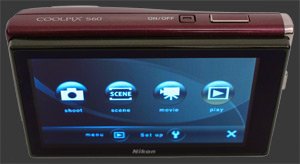
The Home button triggers a screen with 7 buttons. Four buttons are for camera modes: Record, Scene, Movie and Playback. The others activate the main menu, the setup menu and close the home screen, which you can also do by tapping the shutter. The menu system hides major camera settings in two pages. Changing settings is done by selecting a menu button which lists options as one or more pages of buttons. The specific button is pressed and then the change must be accepted with a press of the OK button located on the right side of the screen.
Each mode except for Scene mode is entered directly after pressing its icon. For scene mode, the camera presents 18 icons, one for each scene mode, including the Auto-Scene mode. The icons are not so intuitive but there is a help system which describes them. Using a scene mode is like having a joystick to control a robot which drives your car. You still have to control the robot at each turn to get to where you want but you don't have to drive yourself. Effort is still required but you are much more constrained. The Coolpix S60 has a few special scene modes which do more than simply set specific settings. It also has a voice-recording mode to record audio-only clips.
The Play button enters playback mode. A display of the last taken image appears with the mode slider on the upper left and an icon saying 'DISP' on the bottom left. The home button remains on the lower right corner. At this point, the display image can be zoomed or another image can be displayed by sliding the image shown to a side. Because both zooming and changing images involve touching the image display first, it is quite easy to zoom in when wanting to change image.
The 'DISP' icon summons more playback feature icons, including Retouch, Delete, Next, Previous, Zoom In and Zoom Out/Thumbnail View. Images rotate with camera movements, to keep them mostly facing correctly. Deletion in thumbnail view can affect multiple images.
The 3.5" LCD shows each image after it is taken. There is no way to disable this, so we cannot know if it would be any faster without the image review. Visibility is very good though which compensates well for the lack of an optical viewfinder.
As long as the touch-screen responds, Playback mode is fast enough. Although the camera shows aperture, shutter-speed and the set ISO while shooting, it does not in Playback mode. Playback mode only shows the resolution, image number, date and time.
The S60 uses SD or SD-HC memory cards, which are presently the cheapest and most common form of flash memory. Images are numbered in a standard form but the number keeps increasing even after changing the memory card. Not only is this rather annoying, there is also no menu option to reset the counter to zero. Then again, maybe only camera reviewers care about this.
Nikon Coolpix S60 Conclusion
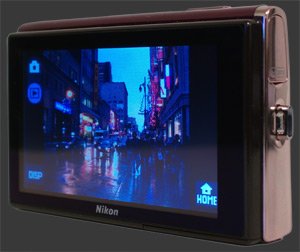 As an ultra-compact digital camera, the Nikon Coolpix S60 lives in the category with the most models. Luckily, this model does several things to distinguish itself. To start, its 3.5" LCD is the largest which can fit in an ultra-compact. Add a non-protruding slightly wide 5X optical zoom lens with stabilization and the S60 shows itself as a unique offering. The cost of this uniqueness is a touch-screen interface which can frustrate users trying to use the camera beyond pointing and shooting.
Overall image quality and speed is average with some good points like color, sharpness and shutter-lag. Not so good points include high noise and low details from ISO 400 up, pronounced optical distortion and relatively slow auto-focus on average. Battery life, probably due to such a large and bright LCD, is very low, something to keep in mind.
Zoom and camera size can be extremely important for many, more so than megapixels and LCD size. Those people will appreciate the S60's ultra-compact size and combined 5X optical zoom. There are only a few such cameras, including the excellent Fuji Finepix F100fd with its 5X wide-angle lens and its stellar performance in low-light. For even more optical zoom, the Pentax Z10

 |


|

Please Support Neocamera
All information on Neocamera is provided free of charge yet running this website is a huge endeavor. Purchases made via affiliate links found throughout the site help keep it running and up-to-date. There is no additional cost to you, so please consider buying via these links to our affilates:




Thank you for your support!


Nikon S60 Highlights


 Ultra-Compact digital camera
Sensor-Size: 6 x 5mm

Actual size when viewed at 100 DPI
| 10 Megapixels Ultra Compact | ISO 64-2000 |
| 5X Optical Zoom | Shutter 1/1500-4s |
| Built-in Stabilization | Custom white-balance |
| 0.7 FPS Drive, Unlimited Images | Lithium-Ion Battery |
| 640x480 @ 30 FPS Video Recording | Secure Digital High Capacity |
| 3.5" LCD 230K Pixels |
Camera Bag


Your camera bag is empty. To add a camera or lens click on the star next to its name.
Your camera bag is empty.
Add cameras or lenses by clicking on the star next to their name.
Updates
2026.09.08

The Wild Magic of Iceland Book Review
Review of The Wild Magic of Iceland by Norris Niman. A photographic journey through seasons.
2026.07.31

ZY Optics Pittura 30mm F/2.4 Medium-Format Lens Review
The ZY Optics Pittura 30mm F/2.4 is a manual lens designed exclusively for Medium-Format Digital Cameras. This fast prime lens captures a wide field-of-view, equivalent to a 24mm on Full-Frame. It is am affordable alternative to first-part GFX and XCD lenses.
2026.07.26

Fujifilm GFX100S II Review
Express review of the Fujifilm GFX100S II. This 102 MP Medium-Format Mirrorless Digital Camera packs an 5-Axis 8-Stop IBIS and a 5.8 MP 0.5" EVF showing 100% coverage at an extra-large 0.84X magnification. It is a more compact version of the flagship GFX100 II. This review covers exactly how these camera compare.
2026.07.14

Sony Alpha A7R VI Review
Extended In-Depth Review of the Sony Alpha A7R VI. This flagship Full-Frame Mirrorless Digital Camera combines ultra-high 67 MP resolution with very fast 30 FPS continuous shooting. It packs a 5-axis 8½-stop IBIS mechanism and an ultra-sensitive 759-Point Phase-Detect AF system. Its incredibly sharp 9.4 MP 0.64" EVF has a huge 0.9X magnification, 100% coverage, 10-bit HDR and 100% DCI-P3 color-space. Captures 8K video at 30 FPS or 4K video at 120 FPS.
2026.05.21

Laowa 4.5-10mm F/2.8 Fisheye Zoom Lens Review
In-depth review of the Venus Optics Laowa 4.5-10mm F/2.8 Fisheye Zoom Lens. This lens zooms from a circular to rectangular fisheye with an 180° viewing angle. This review analyses its optical quality, construction and handling.
2026.04.13

Laowa 17mm F/4 Zero-D Shift Review
In-Depth review of the Venus Optics Laowa 17mm F/4 Zero-D Shift Lens. This ultra-wide Shift lens is specifically designed for Mirrorless Digital Cameras and is available in 4 Full-Frame mounts plus 2 Medium-Format ones.
2025.11.13

Best Gifts for Photographers in 2025 by Budget
The annual Neocamera Photography Gift Guide updated to 2025. Find great gifts for photographers with any price budget.
2025.07.07

Stellar Photo Recovery Review
Review of Stellar Photo Recovery V12. This Windows and MacOS software can recover photos and videos in a huge number of formats from memory cards, USB drives, SSDs and HHDs.
2025.05.14

Huion Kamvas 13 Gen 3 Review
In-Depth review of the Huion Kamvas 13 Gen 3 Pen Display Tablet for photographers and graphic artists.
2025.01.18

Fujifilm GFX 2025 Lens Roundup
Lens Review roundup of Fujifilm GFX Medium-Format lenses. Quality, performance and handling of the GF20-35mm F/4R WR, GF30mm F/3.5 Tilt-Shift and the GF55mm F/1.7.
2024.11.18

Best 2024 Photography Gifts for Every Budget
Great gifts for photographers and photo enthusiasts selected for every budget among the best products of 2024.
2024.08.07

Eye Protection Tips for Professional Photographers
The four main considerations for professional photographers regarding eyewear.
2026.09.08
2026.07.31
2026.07.26
2026.07.14
2026.05.21
2026.04.13
2025.11.13
2025.07.07
2025.05.14
2025.01.18
2024.11.18
2024.08.07