Camera Basics
 Camera Choosing
 Camera Models
 Camera Buying
 DSLR Buying

HP Photosmart R967 Review
 10 Megapixels
 VGA Video: 640 x 480 or more but less than 1280 x 720.
 Manual Controls: Both fully-manual (M) and semi-automatic modes (T and V).
 Custom White-Balance: Specifies exactly what should be white to the camera.
 Action Photography: Shutter speeds of 1/1500 or more.
 Night Photography: Reaches shutter-speeds longer than 4 seconds.
 Spot Metering
 Accepts Secure Digital (SD) memory.
 Neocamera detailed review
 Discontinued: No longer produced by the manufacturer. May still be in stock or found used.
 1 - Capability2 - Usability3 - Performance
HP Photosmart R967 Introduction
The HP Photosmart R967 is a metallic digital camera with numerous features and technologies. This is a relatively versatile ultra-compact camera which follows HP's tradition of simplicity and ease-of-use. Surprisingly, ease-of-use does not necessarily mean efficiency-of-use, as it is described below. Also described below are the limitations of the HP Photosmart R967.
The most significant features of the R967 are:
- 10 Megapixels sensor
- 3X Optical Zoom
- ISO 100 to 400 sensitivities
- 1/2000 to 16s shutter-speeds
- Exposure compensation from -3 to +3 EV, in 0.3 EV increments
- Exposure modes: program, aperture-priority, shutter-priority, full-manual, scene-modes
- White-balance: automatic, sun, shade, tungsten, fluorescent and custom
- Focusing: normal, macro, auto-macro, infinity and manual
- Metering: center-weighed, average and spot
- Bracketing, continuous drive and self timer
- Adaptive-lighting and in-camera panorama stitching
- 3" LCD 230K Pixels 170 Degree viewing-angle
- 640x480 @ 24 FPS movie mode
- Built-in help system
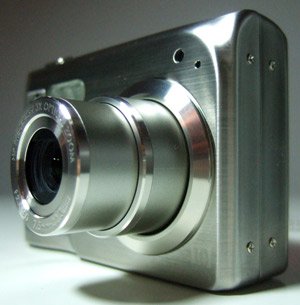
Reminder: In all our full-reviews, such as this one, we concentrate on usability and the experience of using the digital camera. There are a lot of points mentioned which apply to some photographic needs, but not to others. Image quality is analyzed under expected viewing conditions, like full-screen viewing and various print sizes, but it is not scrutinized under a magnifying glass. Neocamera full-reviews analyze how a digital camera lets itself be used by the photographer.
HP Photosmart R967 Suitability - What is it good for?
With a 10 megapixels sensor, a 3X optical zoom lens and full manual controls, the HP Photosmart R967 aims to be a general purpose camera. Its high-resolution sensor provides enough resolution for large prints, normally up to 13" x 19". The 3X optical zoom lens, equivalent to 35-105mm in 35mm terms, is minimal nowadays. This zoom range is neither wide nor long, so isolating a subject requires getting quite close to it. Such a short zoom range is not ideal for sports, wide-life or architectural photography. This digital camera's full manual controls allow for creative photography with selectable shutter-speeds and apertures in 1/3 EV steps. Only a handful of ultra-compact cameras sport full manual controls. Manual focus is also possible using a vague scale and unclear zoomed preview. With shutter-speeds from 1/2000s to 16s, movement can be frozen well and low-light photography is easily possible. It has three metering options: center-weighed, average and spot. These are useful for controlling the resulting exposure without entering manual mode.
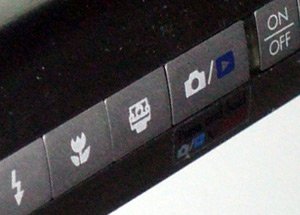
The R967's limited ISO range means relying on its powerful integrated flash for social photography. With a quite powerful flash, shots of typical-sized rooms can come out as long as no object ends up too close to the camera. For larger rooms beyond the reach of built-in flash, like hotel lobbies or reception halls, this camera's limited ISO range lets it down. Shots in such a large rooms frequently come out with bright subjects over a dark and cavernous background. Photographers who regularly shoot in such conditions should look for a camera with high-ISO capabilities instead.
The white-balance options of this HP digital camera are suitable for even the most unusual lighting, thanks to a custom white-balance option. Saturation, sharpness, contrast and adaptive-lighting are adjustable in 3 steps to allow additional control over the final image. The R967 can focus normally from 0.5m (at wide-angle) or 0.6m (at telephoto). In macro mode, it can focus as close as 10cm from the lens. Since this minimal distance occurs at the widest setting, the resulting close up is underwhelming. There is an auto-macro focus mode which selects automatically between normal and macro focusing, at the expense of slower performance. Also, there is an infinity focus mode which is very useful for shooting from moving vehicles, shooting distance subjects when the camera cannot focus and for shooting panoramas to ensure focus consistency.
Numerous features are built into the R967 which help nailing the desired shot. For group shots and long exposures, there is a self-timer which takes one or two shots after a delay between 2 and 30s. Three bracketing modes are available when experimenting with the look of a picture: adaptive-lighting for dealing with high-contrast situation, exposure for nailing the best exposure and color-mode for choosing a color or monochrome picture, either greyscale or sepia.
With its compact size, roughly 1.1" thick, and its durable metal body, the HP Photosmart R967 is easy to carry around. There are two things to watch out for: the LCD, so big compared to the camera that it is bound to get fingerprinted and the battery compartment door, which seems so flimsy it could break off without much effort. The provided wrist-strap with tightening element keeps the camera relatively secure. Its use of standard SD cards, currently the cheapest type of memory available, makes it easy to supply it with plenty of memory. At the highest image quality, the 10 megapixels images produced by this camera are not as big as we expected. You get 174 images on a 512 MB SD card. However, video only gets you 11 minutes at its maximum resolution of 640x480 24 FPS.
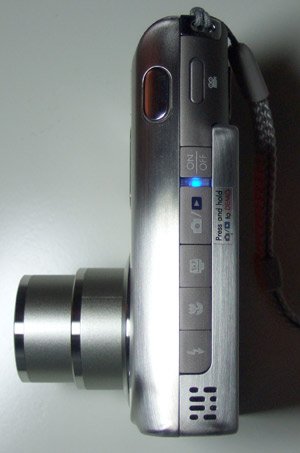
It is unfortunate that this camera requires the use of a docking station for recharging its lithium-ion battery. Not only are these proprietary batteries expensive, but they are nearly impossible to find in an emergency. As for the dock, it is not such a bad thing when left at home with all its cables connected to a desktop computer. Use it with a laptop and it won't be so pleasant. Traveling is more cumbersome though since you must carry the dock, which is larger than the camera, a transformer and a power cord - plus electrical adapters depending where you go. Speaking about power, a spare battery is most likely needed, the R967 sucks one dry too rapidly. Another negative point about not having a separate charger is that the camera has to be hooked up to charge a battery.
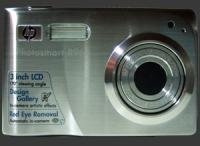 |


|
 Next1 - Capability2 - Usability3 - Performance
Please Support Neocamera
All information on Neocamera is provided free of charge yet running this website is a huge endeavor. Purchases made via affiliate links found throughout the site help keep it running and up-to-date. There is no additional cost to you, so please consider buying via these links to our affilates:




Thank you for your support!


HP R967 Highlights


 Ultra-Compact digital camera
Sensor-Size: 8 x 6mm

Actual size when viewed at 100 DPI
| 10 Megapixels Ultra Compact | ISO 100-400 |
| 3X Optical Zoom | Shutter 1/2000-16s |
| 640x480 @ 24 FPS Video Recording | Full manual controls, including Manual Focus |
| 3" LCD 230K Pixels | Custom white-balance |
| Spot-Metering | |
| Lithium-Ion Battery | |
| Secure Digital |
Extras - What else does it do?
The HP Photosmart R967 has a few interesting features related to photography. These are: adaptive-lighting, in-camera panorama stitching and built-in help. Adaptive lighting is technology which reduces image contrast in order to increase the visibility of shadow details. Adaptive lighting is either off, low or high. There is also adaptive lighting bracketing which takes a single photograph and writes it three times, once with each adaptive lighting option.
Adaptive lighting is a processing algorithm which is applied to an image after it has been captured by the sensor. It is similar to choosing a different contrast curve during RAW conversion, except that the R967 does not have a RAW mode. Since shadow details are brightened, noise levels in those areas may increase slightly. If the image is already bright enough, adaptive lighting has no effect. Sometimes adaptive lighting produces less pleasing images which have a flatter look. This occurs because our visual system interprets distance using lighting cues. Modifying lighting, therefore modifies our perception of depth. On the other hand, our eyes adapt to light intensity as they scan our surroundings which increases our perception of dark and bright details.

Adaptive-Lighting OFF

Adaptive-Lighting LOW

Adaptive-Lighting HIGH
The R967 features panorama assistance and panorama stitching. The panorama assist mode allows horizontal panoramas between 2 and 5 images to be taken from left-to-right or vice-versa. Instead of simply showing a piece of the previous image to align, this camera goes further by showing an overlay with image edges to align. This allows to use the full surface of the LCD to compose each image and to get an idea of how features will match. A set of images captured using the panorama assist mode can be merged together right in the camera. The process takes several seconds and results in a low-resolution panorama suitable for web-use and small prints. Since the source images are kept, a full-resolution panorama can be created later on a personal computer.
The final major extra feature of this camera is its extensive help system. There is descriptive text for every option and even explanations of camera buttons, photography tips, HP services and camera accessories. This is definitely a plus for beginners who wish to
Camera Bag


Your camera bag is empty. To add a camera or lens click on the star next to its name.
Your camera bag is empty.
Add cameras or lenses by clicking on the star next to their name.
Updates
2025.11.13

Best Gifts for Photographers in 2025 by Budget
The annual Neocamera Photography Gift Guide updated to 2025. Find great gifts for photographers with any price budget.
2025.07.07

Stellar Photo Recovery Review
Review of Stellar Photo Recovery V12. This Windows and MacOS software can recover photos and videos in a huge number of formats from memory cards, USB drives, SSDs and HHDs.
2025.05.14

Huion Kamvas 13 Gen 3 Review
In-Depth review of the Huion Kamvas 13 Gen 3 Pen Display Tablet for photographers and graphic artists.
2025.01.18

Fujifilm GFX 2025 Lens Roundup
Lens Review roundup of Fujifilm GFX Medium-Format lenses. Quality, performance and handling of the GF20-35mm F/4R WR, GF30mm F/3.5 Tilt-Shift and the GF55mm F/1.7.
2024.11.18

Best 2024 Photography Gifts for Every Budget
Great gifts for photographers and photo enthusiasts selected for every budget among the best products of 2024.
2024.08.07

Eye Protection Tips for Professional Photographers
The four main considerations for professional photographers regarding eyewear.
2024.07.14

Fujifilm X100VI Review
Flagship fixed-lens compact digital camera with a 40 MP sensor and Image-Stabilization, a first for the series. Retro design featuring dual control-dials, plus direct ISO, Shutter-Speed and EC dials. Its hybrid viewfinder can switch between EVF and OVF mode.
2024.05.09

Fujifilm GFX100 II Review
Flagship 102 Megapixels Medium-Format Mirrorless Digital Camera with 8-Stop 5-Axis IBIS, 8 FPS Drive, 8K Video and 400 MP Super-Resolution capture in a weatherproof and freezeproof body with dual control-dials and dual memory-card slots.
2024.04.03

Fujifilm X-T5 Review
Newest Fujifilm flagship boasting a 40 MP APS-C sensor, 5-axis IBIS with 7-stop efficiency, 15 FPS continuous drive, 6.2K Video capture, dual control-dials and dual SDXC UHS-II slots in a sturdy weatherproof and freezeproof body.
2023.11.20

Best Digital Cameras of 2023
Find out which are the Best Digital Cameras of 2023. All the new Mirrorless Digital Cameras from entry-level to high-end professional.
2023.07.10

Fujifilm X-H2 Review
40 Megapixels APS-C Hybrid Mirrorless Digital Camera with 7-stop IBIS. Fastest shutter ever and 8K video capture. Large builtin EVF with 0.8X magnification and 5.8 MP, plus an Eye-Start Sensor. Packed with features and large number of controls in a weatherproof and freezeproof body.
2023.05.07

Sony FE 20-70mm F/4G Review
Review of the unique Sony FE 20-70mm F/4G lens. The optical zoom of this lens spans ultra-wide-angle and medium focal-length coverage, making it one of the most versatile Full-Frame lenses on the market.
2025.11.13
2025.07.07
2025.05.14
2025.01.18
2024.11.18
2024.08.07
2024.07.14
2024.05.09
2024.04.03
2023.11.20
2023.07.10
2023.05.07