Camera Basics
 Camera Choosing
 Camera Models
 Camera Buying
 DSLR Buying

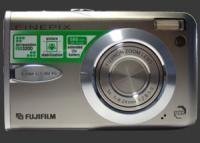
Fujifilm Finepix F30 Review
 6 Megapixels
 Continuous Drive
 VGA Video: 640 x 480 or more but less than 1280 x 720.
 Custom White-Balance: Specifies exactly what should be white to the camera.
 Action Photography: Shutter speeds of 1/1500 or more.
 Night Photography: Reaches shutter-speeds longer than 4 seconds.
 Spot Metering
 Accepts xD memory.
 Neocamera detailed review
 Discontinued: No longer produced by the manufacturer. May still be in stock or found used.
 1 - Usability & Ergonomics2 - Image Quality & Performance
Fujifilm Finepix F30 Introduction
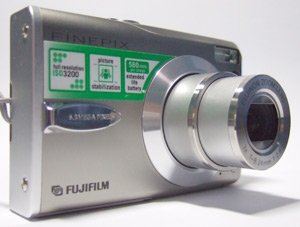
The Fuji Finepix F30 advances Fuji's high-sensitivity leadership with a usable ISO sensitivity range up to 3200 at its full 6 megapixel resolution. This gives unprecedented photo opportunities since this is a first among ultra-compact cameras. The combined quality 3X optical zoom lens, extremely long battery life of 580 shots per chargeCIPA standard, speedy operation and the large ISO range make this a splendid camera for social photography. Even though the F30 uses a proprietary lithium-ion battery which is charged in camera, its fantastic battery life means not having to deal with it often.
Important features of the F30 are:
- ISO sensitivity: Several Auto modesUp to ISO 400, 1600 or 3200), 100, 200, 400, 800, 1600, 3200.
- White balance: Auto, custom, sunlightLabeled Fine, cloudyLabeled Shade, fluorescent3 Types and incandescent.
- Exposure compensation: -2..+2 stops, 1/3 stop increments.
- Aperture priority mode: F2.8/F5 - F8, possible shutter speeds 1/2000s-1/4s.
- Shutter priority mode: 1/1000s-3s, possible apertures F2.8/F5-F8.
- Long shutter mode: 1s-15s, possible apertures F2.8/F5-F8.
- Metering control: Evaluative, center-weighed or spot.
- Drive modes: First 3-frames, last 3-frames, long continuous, self-timer2 or 10 seconds.
- Focus modes: Center, multi-point, continuous.
- Focus distances: normal, high-speedSetup menu option, macro.
- Unlimited 640x480 30 FPS Movie mode with sound.
Fujifilm Finepix F30 Suitability - What is it good for?
The Fuji F30 provides several point-and-shoot modes as well as a few semiautomatic modes. As it is with most ultra-compact digital cameras, a full-manual mode and manual focusing is sadly missing from this very capable camera.
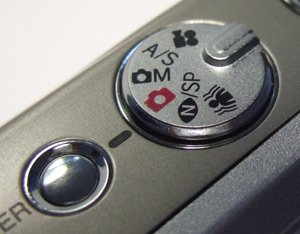
The F30 has several exposure modes, none of which is fully manual, but several are semiautomatic. Both the photography mode and the so-called manual mode are fully-automatic modes and limit their shutter-speeds to 1/4 or faster. These modes are good for typical daytime or indoor photography thanks to available high-ISO sensitivities. There is an automatic night-scene mode which selects shutter speeds up to 3 seconds but locks the ISO setting on automatic. A setup menu option allows to configure the night-scene mode to be semiautomatic, thereby allowing the selection of shutter-speeds between 1 and 15 seconds. These modes are somewhat useful for night-photography but make it difficult to control the resulting exposure.
Unusually for an ultra-compact, this digital camera has both aperture-priority and shutter-priority modes. Unfortunately, neither mode allows the selection or use of all shutter-speeds available to the F30. This can be frustrating, since 3 different modes are required to access the full range of shutter-speeds and each of these modes have different limitations. It was already mentioned that the short-shutter night-scene mode locks the ISO on automatic, but the long-shutter scene-mode neither allows macro or flash photography. Exposure compensation is provided but is disabled in all scene modes.
With ISO sensitivities up to 3200, the Fuji Finepix F30 is well suited for indoor shots with moving subjects such as people. Additionally, Fuji's flash system called i-flash is designed to achieve correct exposure when insufficient light is available without overwhelming the foreground and still maintaining background details. In practice, it works well when the scene is missing one stop or less of light to achieve a shake-free exposure. Beyond that, it just behaves like most flash systems. Among ultra-compact cameras, the F30 is reasonably well-suited for low-light photography, though it is not perfect in that area. As long as a tripod is not necessary, the F30 performs very well due to its high-ISO capabilities. When light is very low, the F30's lack of manual controls gets in the way. Long shutter-speeds can be selected in several low-light modes but each of these modes meters differently and exposure compensation is disabled. This results in a lot of fiddling to trick the F30 into getting the proper exposure. Note that most ultra-compact cameras do far worst and the F30 was still easier to control than the F10. This is easy to see in our night ISO crops.
Other notable features of the F30 are its first-rate movie mode and several useful drive modes. Only a few other digital cameras offer 640x480 30 FPS movie mode with no time or file-size limits. As for drive modes, the last 3-frames mode is very valuable for taking action pictures. In this mode, the camera continuously takes pictures at 2 FPS until the shutter is released and then saves the last 3 pictures taken (the others are discarded). Fuji designed this mode thinking about photographers who want to anticipate action. The other 2 continuous drive modes are rather typical: either 3 images at 3 FPS or 40 images at less than 1/2 FPS.

Fujifilm Finepix F30 Usability - How easy is it to use?
The Fuji F30 is mostly a point-and-shoot digital camera. As such, it is easy to use and has a several easy-to-use automatic modes. It also has a few semiautomatic modes which are somewhat disorganized and require fiddling and frequent visits to the menu system. Both aperture and shutter priority mode are on the same position in the mode-dial, so you have to use the menu to select which one is active. Then controlling the aperture or shutter-speed is simple: press the exposure compensation button and use the 4-way controller to modify aperture or shutter-speed (with left or right arrows) and exposure compensation (with up or down arrows).
There is one position on the mode-dial for all scene modes, so the menu is used to select which one is active. The strange thing is that there are 2 night-shot modes but one is in the list of scene modes in the main menu. There is another menu option in the setup menu that switches the mode which appears in the scene-mode list. Since one allows shutter-speeds from 1s-15s with control over ISO and the other one allows shutter-speeds from 1/1000s-3s with ISO fixed on auto, getting the desired picture can be quite fiddly. To complicate matters further, scene modes lock out many camera options. For example, exposure compensation is not available in any scene-mode, macro is not available in night-scene modes, ISO-settings are not available in all modes and the availability of automatic ISO differs between scene-modes. Overall, we would say that this camera is easy to use as a point-and-shoot, but Fuji seems to have put a great deal of effort for it not to be used more creatively.
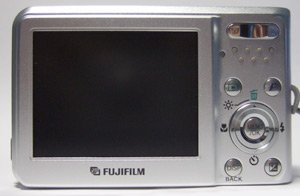
Framing is done using a nice 2.5" LCD which can be brightened momentarily by pressing the up-arrow. This works exceptionally well, although in extremely bright conditions the lack of an optical viewfinder may make framing a challenge. In low light, the LCD gains up very well and remains steady. Otherwise, the LCD is very sharp and very fluid, particularly in 60 FPS mode. The shutter button also has a nice feel, is not too small and has a distinct halfway point. In continuous shooting modes, framing is more challenging since both the first-3 and last-3 modes show images only after they are taken, while the long-period mode shows images before they are taken. In both cases, there is a significant time-difference between what is shown on the LCD and what is pictured. Since there is no optical viewfinder, following a moving subject is very difficult. After each picture is taken, the F30 displays it. There is no way to turn this off. There are 3 display options: 1.5s, 3s and zoom. The zoom option shows the image completely zoomed for inspection of fine details. The 1.5s and 3s option each dismiss the image automatically after the specified time. In all cases, the display can be interrupted after about 1 second. This has the unfortunate consequence of making the F30's shot-to-shot time a little longer than the top competing models.
The metallic F30 feels completely solid but its rectangular shape does not feel secure in hands due to a minimalist finger hook on its front. Luckily, Fuji supplies a sturdy wrist-strap and we highly recommend people to use it. The strap also has a tightening element which can be used to securely attach the camera to your wrist. Even the shutter-like lens cover is metallic which is more sturdy than most competing models. Due to the large LCD and the presence of several rear-mounted buttons, the F30 has neither room for an optical viewfinder nor room for your thumb anywhere other than directly below the zoom-controller. This makes its possible to accidentally press the 'F' button.
The Fuji Finepix F30 has a limited number of external controls. The only 4 functions which can be used without entering some kind of menu are macro on/off, flash-modes, self-timer and exposure-compensation. Other functions are reached either by the 'F' button or the Menu buttonLocated in the center of the 4-way controller. The 'F' button is a Fuji classic, it serves to enter a small menu of commonly used settings. In this menu, the F30 provides 3 settings: image resolution, ISO and color mode. Notice that ISO is the only truly common setting in this menu? We had the same complaint for the F10, so Fuji did not learn this yet. In this menu most users would expect to see at least white-balance and metering (plus ISO, of course). There is clearly room for adding these 2 settings without removing the rarely used ones.
The full menu of the Fuji F30 is called by the 'Menu' button. It is organized as a linear main menu with one of the options activating a 3-page setup menu. The menu is highly textual, significantly improving upon the usability of the F10's iconic menu. We now feel that its usability is similar to competing models. Several common settings such as white-balance, metering and some mode switching require the use of this menu. One minor annoyance we had with the menu is that each time an option is changed, the menu is automatically dismissed, so changing several options requires several trips through the menu system. The menu system has a number of vanishing items which disappear when the F30 would not allow them to be used. This helps knowing what is allowed by the camera but makes looking for menu options difficult because you have to figure out which mode has a particular setting.
Although every button feel solid, they are rather small and it is possible to accidentally press more than one button at the time. The zoom controller has a nice feel to it but provides too few zoom steps to be able to tightly frame a particular subject. There is also a button to enter playback mode. Playback mode is speedy and well implemented. It is easy to rapidly exit playback mode: Either press the playback button again or press the shutter-button halfway. A welcome addition compared to the F10 is the new exposure compensation button which also serves to change aperture or shutter-speed when applicable.
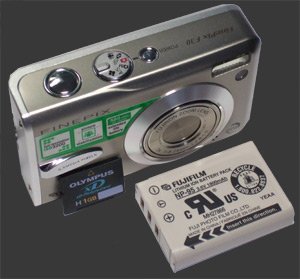
Recharging and connecting the Fuji F30 is simple. To do so, connect the power cable to the transformer and connect the transformer to the F30. The custom battery is charged in the camera itself. The downside of this is that you cannot use one battery while another one is charging, since the camera is busy. The battery goes in using a plastic door that also covers the xD card slot. Fortunately the battery compartment does have a latch, so it will not fall out while changing xD cards. Speaking of cards, xD cards are quite expensive which adds to the price of this camera.
 |


|
 Next1 - Usability & Ergonomics2 - Image Quality & Performance
Please Support Neocamera
All information on Neocamera is provided free of charge yet running this website is a huge endeavor. Purchases made via affiliate links found throughout the site help keep it running and up-to-date. There is no additional cost to you, so please consider buying via these links to our affilates:




Thank you for your support!


Fujifilm F30 Highlights


 Ultra-Compact digital camera
Sensor-Size: 8 x 6mm

Actual size when viewed at 100 DPI
| 6 Megapixels Ultra Compact | ISO 100-3200 |
| 3X Optical Zoom | Shutter 1/2000-15s |
| 2.2 FPS Drive, 3 Images | Custom white-balance |
| 640x480 @ 30 FPS Video Recording | Spot-Metering |
| 2.5" LCD 230K Pixels | Lithium-Ion Battery |
| xD, Internal Memory |
Fuji F30 vs F10
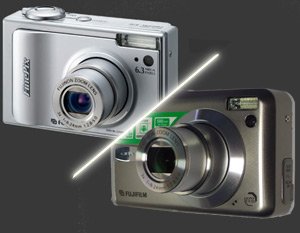
While it is clear that the Fuji Finepix F30 is an evolution of the already superb Fuji F10, there are a number of subtle differences between these two models. Many satisfied F10 owners will have to consider these points before upgrading to an F30.
Obviously the ISO range has changed, the F10 has ISO 80-1600 while the F30 has ISO 100-3200. Since ISO 100 is so clean with both these cameras, the ISO 80 setting does not add much to the F10. On the sensitive side, ISO 3200 is a full-stop more sensitive than ISO 1600 and provides more photo opportunities, particularly when flash cannot be used or is not desirable.
There are some of minor annoyances with the F10 that are improved upon in the F30. The F30 now has a useful battery latch which prevents the battery from falling out while changing the xD card. This is a very welcome addition for everyone who uses a card-reader to download their pictures and everyone who uses a lot of small xD cards. The F30 also does not use a terminal-adapter which was the clunky way to charge the F10's battery. It seems Fuji found a way to include two connectors in the F30, where the F10 only had one - hence the need for the terminal-adapter there. For that, the F30 has a smaller and less powerful battery than the F10. This is not a problem however because Fuji optimized the power consumption of the F30 to bring its battery-life up to 580 shots from 500 shots per charge. Note that the battery is still charged in camera.
Probably the most common complaint regarding the Fuji Finepix F10 was its dreadful menu-system. We are glad to report that the F30's menu system is indeed better than the F10's overly icon menu. It is easier to navigate and most importantly is much more textual, so there is less need to guess what each icon means anymore. However, we wonder why post-shot image display cannot be disabled anymore? Hopefully this is something that can be corrected using a firmware upgrade. The final improvement over the F10 is the LCD, the new display is sharper, updates faster and is even less reflective. Since the F30 does not have any viewfinder, all improvements to the LCD are obviously important.
As if to maintain some balance, Fuji made some minor mistakes with the F30 that were not there with the F10. While the Fuji Finepix F10 had a tripod mount in-line with the lens center, the F30 has it to one side. All the buttons, including the zoom-controller, the power button and the mode-dial, have unfortunately been shrunk a bit. The body of this camera has been redesigned to be more appealing. In doing so, Fuji reduced the size of the front protrusion which served as a grip for the digital camera. The F10 has a full-height protrusion which makes holding it feel more secure. However, the F30 has some soft protrusions below the zoom controller to give more traction to the thumb. Overall, the body design of the F30 is not as practical as that of the F10.
Camera Bag


Your camera bag is empty. To add a camera or lens click on the star next to its name.
Your camera bag is empty.
Add cameras or lenses by clicking on the star next to their name.
Updates
2025.11.13

Best Gifts for Photographers in 2025 by Budget
The annual Neocamera Photography Gift Guide updated to 2025. Find great gifts for photographers with any price budget.
2025.07.07

Stellar Photo Recovery Review
Review of Stellar Photo Recovery V12. This Windows and MacOS software can recover photos and videos in a huge number of formats from memory cards, USB drives, SSDs and HHDs.
2025.05.14

Huion Kamvas 13 Gen 3 Review
In-Depth review of the Huion Kamvas 13 Gen 3 Pen Display Tablet for photographers and graphic artists.
2025.01.18

Fujifilm GFX 2025 Lens Roundup
Lens Review roundup of Fujifilm GFX Medium-Format lenses. Quality, performance and handling of the GF20-35mm F/4R WR, GF30mm F/3.5 Tilt-Shift and the GF55mm F/1.7.
2024.11.18

Best 2024 Photography Gifts for Every Budget
Great gifts for photographers and photo enthusiasts selected for every budget among the best products of 2024.
2024.08.07

Eye Protection Tips for Professional Photographers
The four main considerations for professional photographers regarding eyewear.
2024.07.14

Fujifilm X100VI Review
Flagship fixed-lens compact digital camera with a 40 MP sensor and Image-Stabilization, a first for the series. Retro design featuring dual control-dials, plus direct ISO, Shutter-Speed and EC dials. Its hybrid viewfinder can switch between EVF and OVF mode.
2024.05.09

Fujifilm GFX100 II Review
Flagship 102 Megapixels Medium-Format Mirrorless Digital Camera with 8-Stop 5-Axis IBIS, 8 FPS Drive, 8K Video and 400 MP Super-Resolution capture in a weatherproof and freezeproof body with dual control-dials and dual memory-card slots.
2024.04.03

Fujifilm X-T5 Review
Newest Fujifilm flagship boasting a 40 MP APS-C sensor, 5-axis IBIS with 7-stop efficiency, 15 FPS continuous drive, 6.2K Video capture, dual control-dials and dual SDXC UHS-II slots in a sturdy weatherproof and freezeproof body.
2023.11.20

Best Digital Cameras of 2023
Find out which are the Best Digital Cameras of 2023. All the new Mirrorless Digital Cameras from entry-level to high-end professional.
2023.07.10

Fujifilm X-H2 Review
40 Megapixels APS-C Hybrid Mirrorless Digital Camera with 7-stop IBIS. Fastest shutter ever and 8K video capture. Large builtin EVF with 0.8X magnification and 5.8 MP, plus an Eye-Start Sensor. Packed with features and large number of controls in a weatherproof and freezeproof body.
2023.05.07

Sony FE 20-70mm F/4G Review
Review of the unique Sony FE 20-70mm F/4G lens. The optical zoom of this lens spans ultra-wide-angle and medium focal-length coverage, making it one of the most versatile Full-Frame lenses on the market.
2025.11.13
2025.07.07
2025.05.14
2025.01.18
2024.11.18
2024.08.07
2024.07.14
2024.05.09
2024.04.03
2023.11.20
2023.07.10
2023.05.07