Camera Basics
 Camera Choosing
 Camera Models
 Camera Buying
 DSLR Buying

Olympus SP-600UZ Review
 12 Megapixels
 Ultra-Zoom: At least 10X optical zoom.
 Stabilization: Compensates for tiny involuntary movements of the camera.
 720p HD Video: 1280 x 720 resolution or more but less than 1920 x 1080.
 Action Photography: Shutter speeds of 1/1500 or more.
 Spot Metering
 Runs on standard AA batteries
 Accepts Secure Digital High Capacity (SDHC) and SD memory.
 Neocamera detailed review
 Discontinued: No longer produced by the manufacturer. May still be in stock or found used.
 1 - Usability & Ergonomics2 - Image Quality & Performance
Olympus SP-600UZ Introduction
The Olympus SP-600UZ is a relatively compact ultra-zoom with a stabilized wide-angle 15X optical zoom lens. The lens is equivalent from 28-420mm in 35m terms. This digital camera has a simplified design and interface compared to previous Olympus ultra-zooms. Not only does it supports ubiquitous SDHC memory, it is also powered by standard AA batteries, lowering its cost of ownership and making it one of the most affordable ultra-zooms.
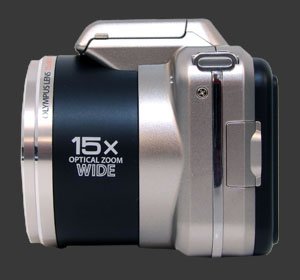
Imaging is provided by a 12 megapixels CCD which has a sensitivity range of 100-1600 and is capable of recording HD wide-screen video at 1280x720 @ 30 FPS, known as 720p. It must be one of the cheapest cameras to support HDMI output at this time.
Key Features
- 12 Megapixels sensor
- 15X stabilized wide-angle optical zoom, equivalent to 28-420mm, F3.5/5.4-8
- ISO Sensitivity from 100 to 1600
- Shutter-speeds from 1/2000s to 4s
- Automatic white-balance, 6 white-balance presetsSunny, Cloudy, Incandescent, Fluorescent 1, Fluorescent 2, Fluorescent 3
- Evaluative and spot metering
- Exposure compensation, -2..+2 EV, 1/3 EV steps
- Shadow adjustment feature
- High-speed shooting modes, 11 FPS @ 3 MP, 15 FPS @ 2 MP and reduced view-angle.
- Panorma modes with in-camera and PC stitching
- 2 and 12s self-timer
- 1280x720 30 FPS 16:9 HD Movie mode
- 2.7" LCD 230K Pixels
- SDHC memory supported
- Uses 4 standard AA batteries
Olympus SP-600UZ Suitability - What is it good for?
The central component of the SP-600UZ is its 15X optical zoom lens which features an extremely versatile range. The wide-end can be used for landscape, interiors and not too big monuments. At the lond-end, the lens reaches far enough for shooting remote action and general wildlife. The aperture range starts from F/3.5 on the wide-end and starts at F/5.4 on the long end, which is not so dark considering the zoom range. Still, the effective built-in stabilization system greatly helps aim with such a lens.
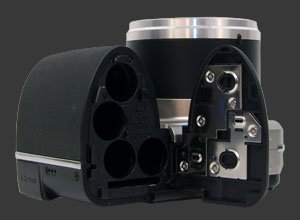
Its relatively compact size and zoom range makes the digital camera a good candidate for travel spanshots. The use of AA batteries is very welcome for traveling as well since such standard batteries can be found anywhere in the world. Disposable ones can be used without trouble which can save you in far away places.
With 12 megapixels of resolution, prints up to 12x9" can be made provided ISO is kept low enough. This is certainly sufficient for the most common print sizes. HD video is obviously good enough for typical home movie as well.
Particular to this digital camera is a set of burst modes of varying resolution. Going down to 2 MP, the SP-600UZ exceeds 15 FPS. It also features tracking autofocus which should make it helpful for capturing speedy action to upload onto the web where most images need less than 1 megapixel anyways.
Olympus SP-600UZ Usability - How easy is it to use?
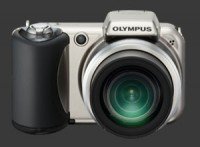
 This compact ultra-zoom is very comfortable thanks to a deep sculpted hand-grip which also provides excellent stability. The entire camera feels sturdy with a good weight. It can be carried for hours using the provided neck-strap and is light enough to be used with a generic wrist-strap equally well. This provides additional discretion while walking around taking photographs.
Stability for such a long zoom is of utmost importance and Olympus has done an excellent job to do so. The solid lens barrel complements the grip very well, allowing a stable two-hand hold while shooting near the telephoto end of the zoom. As mentioned before, there is also a built-in stabilization system which helps get crisp shots.
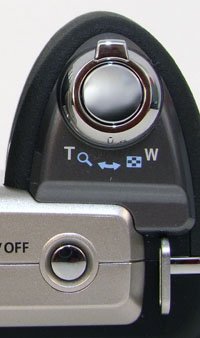
The camera is easy to power-on using a button mounted on the top plate. Atop the hand-grip is the shutter-release which is surrounded by a zoom-controller. The shutter uses the standard two-stage mechanism with short travel and a soft halfway point, making it quick to snap a photo. The zoom is speedy with small steps which makes precise framing relatively easy.
Being strictly point-and-shoot camera, the Olympus SP-600UZ gets away with a small number of buttons, all on the camera's rear, next to the 2.7" LCD, other than the already-mentioned power-button. Although there is no mode-dial, video recording gets its own dedicated button. It is used to start and stop video recording. Just as we've criticized nearly every other camera which lacks a movie-mode, the SP-600UZ suffers from the exact same two problems:
- Setting up initial framing is impossible because once movie-recording start, the aspect ratio changes. At the very least guidelines should be provided like the Fujifilm Finepix HS10
Fujifilm Finepix HS10 does. - There is a 2 second delay before video recording starts because the camera is not ready to shoot video. During this delay, the display shows a useless logo. Needless to say, this prevents following action until recording starts.
Since the camera can shoot both stills and video at any time, the LCD shows the card space in terms of images and video duration. When video recording starts, it replaces the image space counter with a counter showing the increasing lens of the video being recorded.
Olympus has made huge strides towards simplicity with this camera. There is a quick access menu system which leads to the setup menu as its last option. Both menus are neatly organized and are completely intuitive to navigate.
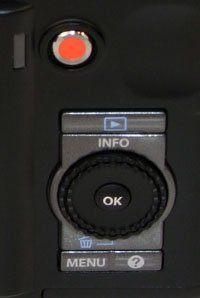 Even though the menu is efficient, any time unnecessarily spent in the menu system slows photographers down. Olympus has regrettably not provided any functions without entering the menu which is something they can very easily fix via a firmware upgrade because most buttons remain unused in capture mode. Particularly, there are 4 buttons that activate the quick menu: Menu, Right, Down and Left. Only one is necessary. There is also a help button which could be made customizable. Most camera makes use the direction buttons to access exposure-compensation, self-timers and the focus mode. A firmware upgrade could enable these and allow a custom function such as ISO to be assigned to the help button. This would make using the Olympus SP-600UZ much more efficient to use.
The up button of the 4-way controller is used to change the display information shown on the LCD. It cycles through basic information, detailed information including a luminance histogram and image-only mode. In playback mode it also cycles through 3 similar screens, only the presentation is different. There is a redundant rotating ring around the 4-way controller which lets people navigate between menu options, exactly like the left and right buttons. This is yet another control which could be put to good use via a firmware update.
The top menu option determines the camera mode. One can choose between P, Intelligent Auto, Scene, Magic filter and Beauty modes. The Intelligent Auto is basically a mode that guesses which scene mode. Magic filters are basically modes which process the output to produce an effect which would obviously be done with far greater control using most image processing software.
Panorama mode has 3 variants, like other models from Olympus. The PC variant takes up to 10 full-resolution images in any direction and saves them individually for assembling using a PC. Between shots, the PC version shows a stripe of the previous shot to help align images. The Manual version provides the same view as the PC version except that a maximum of 3 images can be taken. Instead of saving each image individually, the Manual version produces a low-resolution panorama directly in the camera. The Auto version can create panoramas in-camera in any direction for up to 3 images but does not require the user to press the shutter between shots. Instead, the camera takes each picture when the camera is panned sufficiently.

The biggest usability niggle is related to exposure-compensation. It takes at least 4 button presses to get to the EC control. Then, the camera reduces the image size greatly which makes spotting areas of over-exposure frankly difficult. It is also important to know that until you get to the EC selection screen, the preview is not exposure-priority. In practice this meant that scenes which looked over-exposed on the LCD were not but it took 4 button presses to reach the EC screen thinking that compensation would be required. For this reason, it is important to keep the live-histogram up and use it, rather than the preview, as a reference.
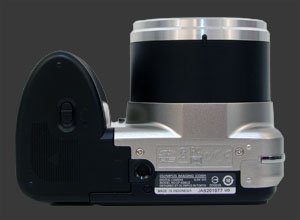
When shooting from a tripod, it takes at least 4 button presses to activate the self-timer. Since it gets reset after each shot, this action needs to be repeated before each new shot. The ideal solution is not to reset the 2s timer between shots. Speaking of tripods, the plastic mount-thread is neither inline with the center of the lens, not with the camera's physical center. At least it is not close to the edge, so the camera remains stable when on a tripod.
The flash has the perfect interface. Lift it to enable its use, keep it down otherwise. This direct and simple approach provides quick and intuitive control over when the flash is used. When the flash is raised, one can choose between 4 modes: Auto, Redeye, Forced and Off.
The rear 2.7" LCD is the only way to frame pictures on this camera. It is bright and fluid with one of the best anti-reflective coatings, making it usable in most conditions. Actually, it often over-compensates in low-light, producing an excessively bright image, so remember to keep an eye on the histogram. The only moment, the LCD becomes useless is during continuous shooting at full-resolution. This is thankfully not a problem in high-speed drive modes. At 5 and 3 megapixels there is a noticeable lag but it is better than most compact cameras when shooting continuously. In 2 megapixels 15 FPS mode, the display keeps up surprisingly smoothly.
 |



 
|
 Next1 - Usability & Ergonomics2 - Image Quality & Performance
Please Support Neocamera
All information on Neocamera is provided free of charge yet running this website is a huge endeavor. Purchases made via affiliate links found throughout the site help keep it running and up-to-date. There is no additional cost to you, so please consider buying via these links to our affilates:




Thank you for your support!


Olympus SP-600UZ Highlights


 Large digital camera
Sensor-Size: 6 x 5mm

Actual size when viewed at 100 DPI
| 12 Megapixels Ultra Zoom | ISO 100-1600 |
| 15X Wide Optical Zoom | Shutter 1/2000-4s |
| Built-in Stabilization | Spot-Metering |
| 1.1 FPS Drive, 9 Images | Standard AA Battery |
| 1280x720 @ 30 FPS Video Recording | Secure Digital High Capacity, Internal Memory |
| 2.7" LCD 230K Pixels |
Camera Bag


Your camera bag is empty. To add a camera or lens click on the star next to its name.
Your camera bag is empty.
Add cameras or lenses by clicking on the star next to their name.
Updates
2025.11.13

Best Gifts for Photographers in 2025 by Budget
The annual Neocamera Photography Gift Guide updated to 2025. Find great gifts for photographers with any price budget.
2025.07.07

Stellar Photo Recovery Review
Review of Stellar Photo Recovery V12. This Windows and MacOS software can recover photos and videos in a huge number of formats from memory cards, USB drives, SSDs and HHDs.
2025.05.14

Huion Kamvas 13 Gen 3 Review
In-Depth review of the Huion Kamvas 13 Gen 3 Pen Display Tablet for photographers and graphic artists.
2025.01.18

Fujifilm GFX 2025 Lens Roundup
Lens Review roundup of Fujifilm GFX Medium-Format lenses. Quality, performance and handling of the GF20-35mm F/4R WR, GF30mm F/3.5 Tilt-Shift and the GF55mm F/1.7.
2024.11.18

Best 2024 Photography Gifts for Every Budget
Great gifts for photographers and photo enthusiasts selected for every budget among the best products of 2024.
2024.08.07

Eye Protection Tips for Professional Photographers
The four main considerations for professional photographers regarding eyewear.
2024.07.14

Fujifilm X100VI Review
Flagship fixed-lens compact digital camera with a 40 MP sensor and Image-Stabilization, a first for the series. Retro design featuring dual control-dials, plus direct ISO, Shutter-Speed and EC dials. Its hybrid viewfinder can switch between EVF and OVF mode.
2024.05.09

Fujifilm GFX100 II Review
Flagship 102 Megapixels Medium-Format Mirrorless Digital Camera with 8-Stop 5-Axis IBIS, 8 FPS Drive, 8K Video and 400 MP Super-Resolution capture in a weatherproof and freezeproof body with dual control-dials and dual memory-card slots.
2024.04.03

Fujifilm X-T5 Review
Newest Fujifilm flagship boasting a 40 MP APS-C sensor, 5-axis IBIS with 7-stop efficiency, 15 FPS continuous drive, 6.2K Video capture, dual control-dials and dual SDXC UHS-II slots in a sturdy weatherproof and freezeproof body.
2023.11.20

Best Digital Cameras of 2023
Find out which are the Best Digital Cameras of 2023. All the new Mirrorless Digital Cameras from entry-level to high-end professional.
2023.07.10

Fujifilm X-H2 Review
40 Megapixels APS-C Hybrid Mirrorless Digital Camera with 7-stop IBIS. Fastest shutter ever and 8K video capture. Large builtin EVF with 0.8X magnification and 5.8 MP, plus an Eye-Start Sensor. Packed with features and large number of controls in a weatherproof and freezeproof body.
2023.05.07

Sony FE 20-70mm F/4G Review
Review of the unique Sony FE 20-70mm F/4G lens. The optical zoom of this lens spans ultra-wide-angle and medium focal-length coverage, making it one of the most versatile Full-Frame lenses on the market.
2025.11.13
2025.07.07
2025.05.14
2025.01.18
2024.11.18
2024.08.07
2024.07.14
2024.05.09
2024.04.03
2023.11.20
2023.07.10
2023.05.07