Camera Basics
 Camera Choosing
 Camera Models
 Camera Buying
 DSLR Buying

Nikon D3000 Review
 10 Megapixels
 Single Lens Reflex
 Continuous Drive
 Manual Controls: Both fully-manual (M) and semi-automatic modes (T and V).
 Custom White-Balance: Specifies exactly what should be white to the camera.
 Action Photography: Shutter speeds of 1/1500 or more.
 Night Photography: Reaches shutter-speeds longer than 4 seconds.
 Hotshoe: Allows external flash units to be attached.
 Spot Metering
 Accepts Secure Digital High Capacity (SDHC) and SD memory.
 Neocamera detailed review
 Discontinued: No longer produced by the manufacturer. May still be in stock or found used.
 1 - Capability2 - Usability3 - Performance
Nikon D3000 Introduction
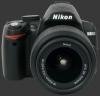

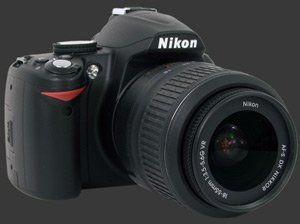
The D3000 is Nikon's latest entry-level DSLR camera. This is a relatively compact DSLR camera with a 10 megapixels sensor, a Nikon electronic-only lens mount and most features usually found among such entry-level cameras.
The Nikon D3000 is targeted at new DSLR owners who are looking for a compact model with basic functionality and a simple interface. As such, the D3000 is also designed to be an introduction to Nikon DSLRs, with classic Nikon styling, reputable build quality and an interface which would be familiar to previous Nikon owners.
This review takes a close look at the D3000's features, ergonomics, usability, image quality, performance and photographic controls. The D3000 has the following major features:
- 10 Megapixels image sensor, 1.5X crop-factor.
- Automatic and selectable ISO from 100 to 3200.
- 1/4000s to 30s shutter-speeds, plus bulb mode.
- Metering modes: multi-segment, center-weighed and spot.
- Standard PASM full manual controls.
- Fully automatic mode and 7 additional scene modes.
- Exposure compensation: -5..+5 EV in 1/3 EV steps.
- Flash compensation: -3..+1 in 1/3 EV steps.
- Standard flash modes: normal, redeye, slow, slow with redeye and rear-curtain sync.
- Automatic, preset and custom white-balance, all fine-tunable.
- Focus modes: single-shot, continuous, manual and auto.
- 11-point auto-focus system.
- Single shot, unlimited 3 fps continuous drive mode and customizable self-timer.
- 3” LCD 230K Pixels with eye-start sensor.
- 95% coverage viewfinder with 0.8X magnification.
- Image review with magnification.
- Luminance and RGB histograms.
- Built-in flash and hot-shoe.
- Lithium-ion battery.
- Secure Digital High Capacity memory support.
- Auto-Exposure/Auto-Focus Lock button, selectable AEL & AFL, AEL, AFL, AEL Hold and AF On function.
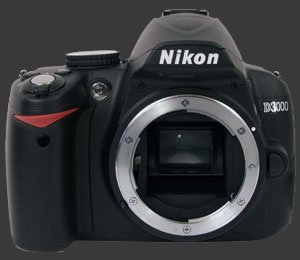
Features, continued:
- Customizable sharpness, contrast, brightness, saturation and hue.
- Customizable function button.
- JPEG and RAW modes.
- Rangefinder manual focus assist.
- Adaptive D-Lighting for high-contrast situations.
- Hardware dust-reduction to reduce the need to clean the image sensor.
Note that as the Nikon D3000 is extremely similar in ergonomics and features to the D60, large portions of this review are taken from the Nikon D60
Nikon D60 review. For performance and conclusion, go directly to page 3. Differences are highlighted in the text below for those who wish to know what they all are.
Nikon D3000 Suitability - What is it good for?
The Nikon D3000 is a simple DSLR, yet it is versatile due to its selection of lenses, wide ISO range and full manual controls. It is suitable for most photographic subjects, although it is not ideal for action photography due to its limited speed continuous-drive. The Nikon D3000 is fully compatible with Nikon lenses with built-in focus-motors and Nikon Speedlights.
For specific photographic subjects, lens versatility is quite important. The Nikon lens lineup covers a wide variety of focal-lengths from the ultra-wide to the super telephoto. Most 3rd party manufacturers produce lenses for Nikon mounts too. With Nikon, image stabilization is provided by VR (Vibration Reduction) lenses which is not available on all lenses.
Being one of the smallest DSLRs currently available, the D3000 brings more discretion than is afforded by typical DSLR cameras. While this is a feature that professionals can appreciate, the D3000 is not made for changing settings quickly and often. Advanced users should also note the lack of features such as bracketing, depth-of-field preview and critical customization.
Nikon D3000 Capability - What can it do?
As noted in the introduction, the Nikon D3000 has all basic DSLR capabilities. It also has a built-in dust-reduction mechanism which is becoming standard these days. This Nikon DSLR features a Nikon lens mount with all-electric contacts and, therefore, no mechanical coupling for driving non-CPU auto focus lenses.
This limits the D3000's choice of lenses to recent Nikon and third-party offerings. Lenses using a mechanical coupling still work but only in manual focus mode. Nikon added a Rangefinder mode to the D3000 to focus manually. This mode swaps the exposure indicator in the viewfinder with a focus direction indicator.
The Nikon D3000's power-switch surrounds the shutter-release and works in the most obvious way. The shutter-release on this DSLR is a standard 2-stage release with a distinct halfway point. By default, pressing the shutter-release halfway locks focus and exposure. There is an option to disable exposure-locking.
There is also a combined AE-L/AF-L button which can be set to lock both exposure and focus, to lock either focus or exposure, to lock and hold exposure or to activate the auto focus Setting this button to trigger auto focus has the unexpected side-effect of disabling AF activation when pressing the shutter-release halfway. For people who like to be able to lock focus and exposure independently and to lock both without changing settings, you must set the AE-L/AF-L function at AE-L Only and lock exposure first when desired.
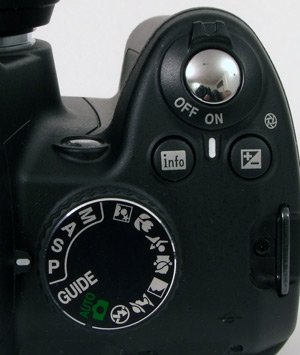
Exposure modes on the Nikon D3000 are controlled by a typical mode-dial. The available modes include the four ubiquitous exposure modes: program (P), shutter-priority (S), aperture-priority (A) and full manual (M) mode. In Manual mode, the shutter-speed selection includes a Bulb mode that keeps the shutter open as long as the shutter-release is pressed. The mode-dial also includes 7 scene modes and an Auto mode.
The Auto mode is not completely automatic but limits use of certain features. Specifically, only 3 flash modes are available, ISO selection includes Auto-ISO and only two focus modes are available. Auto mode disables white-balance, exposure-compensation, flash-compensation, program-shift, metering options and image parameters.
The Auto-ISO behavior of the D3000 is a little strange, except in Auto or Scene mode where it behaves as usual. Users normally select between Auto and a set sensitivity. The camera then honors the selected ISO or, in the case of Auto-ISO, selects an appropriate ISO for the subject. With the D3000, the normal metering modes require a specific ISO to be chosen. The selected ISO is honored when the ISO auto option is set to OFF in the Camera Settings Menu. Otherwise, the selected ISO becomes the default and the camera is free to choose a different ISO.
The Nikon D3000 has detailed control over white-balance including automatic white-balance, preset white-balanceIncandescent, Fluorescent, Sunlight, Flash, Cloudy and Shade., and custom white-balance. All white-balance options can be fine-tuned in 13-steps from magenta to green and blue to amber. There is a single custom white-balance register which can be set by taking a picture of a white object or by using an existing picture as reference.
Exposure compensation can be adjusted in 1/3 EV increments using the exposure compensation button combined with the command dial. The range of exposure compensation is -5 to +5. This is more range than most digital cameras. The exposure steps are always fixed at 1/3 EV though. It would be really nice if 1/2 EV steps were allowed too because they produce distinct aperture and shutter-speed choices. This is the sort of price to pay which is expected from an entry-level DSLR.
Next to the EC button is the Info button. This one invokes or dismisses the information screen which is used to set common camera options without entering the menus. It also appears when touching certain buttons like EC. This is unfortunate as it adds glare right bellow your eye when composing a photograph. The Information screen itself is well-designed and easy to navigate, just press the the lower-left button to activate navigation and use the 4-way controller to operate the screen. The same options are much longer to change through the normal menu system. On the D60, the Info button was the Adaptive D-Lighting button which is available from the information screen.
The placement of this button is a prime location because it is easily reachable and usable in conjunction with the control-wheel. Seems it would have been better used if it controlled ISO instead and that the Info-screen would be automatic like on the D60 which had an eye-start sensor to activate it automatically. This is the only feature lost when moving from the D60 to the D300.
Active D-Lighting is Nikon's automatic image contrast correction feature. This feature brightens darker areas to produce a less contrasty image. For high contrast scenes this can produce an image with more detail while adding noise to shadows. Low contrast scenes are generally unaffected by D-Lighting. Medium contrast scenes are a little hit-or-miss with Active D-Lighting because they lose their punch when the contrast is reduced too much.
This Nikon supports the standard drive modesSingle, continuous and self-timer., remote-trigger and delayed mirror-trigger. In continuous drive mode, the D3000 can shoot an unlimited number of JPEG images at 3 FPS. The self-timer is customizable with possible 2s, 5s, 10s and 20s delay. Each time the self-timer is used, it resets itself. Those who experiment with multiple shots from a tripod will find this behavior rather annoying. The ideal implementation of this is the one devised by Minolta where short timers do not reset themselves but long ones do.
By default, the drive mode is selected using the Function (Fn) button. This button can also be customized to toggle the self-timer, select image quality, select ISO sensitivity or select white-balance. For tripod work, it is ideal to set it to activate the self-timer.
The Nikon D3000 supports JPEG and RAW images. JPEG images are available in 3 quality levels. There are also 3 image sizes available. A combined JPEG+RAW mode is also selectable and always produces basic JPEG files.
The image sensor is protected by a moving plate which serves to shake off dust, reducing its accumulation. While we have not measured its efficiency, these systems are generally not 100% effective and they only remove light dust-particles. Any significantly stuck particle requires manual cleaning.
 |



 
|
 Next1 - Capability2 - Usability3 - Performance
Please Support Neocamera
All information on Neocamera is provided free of charge yet running this website is a huge endeavor. Purchases made via affiliate links found throughout the site help keep it running and up-to-date. There is no additional cost to you, so please consider buying via these links to our affilates:




Thank you for your support!


Nikon D3000 Highlights


 SLR digital camera
Sensor-Size: 24 x 16mm

Actual size when viewed at 100 DPI
| 10 Megapixels DSLR | ISO 100-3200 |
| Nikon F Mount 1.5X FLM | Shutter 1/4000-30s |
| 95% Coverage Medium Viewfinder | Full manual controls, including Manual Focus |
| Built-in Dust Reduction | Custom white-balance with 2 axis fine-tuning |
| 3 FPS Drive, Unlimited Images | Spot-Metering |
| 3" LCD 230K Pixels | Hot-Shoe |
| Lithium-Ion Battery | |
| Secure Digital High Capacity |
Camera Bag


Your camera bag is empty. To add a camera or lens click on the star next to its name.
Your camera bag is empty.
Add cameras or lenses by clicking on the star next to their name.
Updates
2025.11.13

Best Gifts for Photographers in 2025 by Budget
The annual Neocamera Photography Gift Guide updated to 2025. Find great gifts for photographers with any price budget.
2025.07.07

Stellar Photo Recovery Review
Review of Stellar Photo Recovery V12. This Windows and MacOS software can recover photos and videos in a huge number of formats from memory cards, USB drives, SSDs and HHDs.
2025.05.14

Huion Kamvas 13 Gen 3 Review
In-Depth review of the Huion Kamvas 13 Gen 3 Pen Display Tablet for photographers and graphic artists.
2025.01.18

Fujifilm GFX 2025 Lens Roundup
Lens Review roundup of Fujifilm GFX Medium-Format lenses. Quality, performance and handling of the GF20-35mm F/4R WR, GF30mm F/3.5 Tilt-Shift and the GF55mm F/1.7.
2024.11.18

Best 2024 Photography Gifts for Every Budget
Great gifts for photographers and photo enthusiasts selected for every budget among the best products of 2024.
2024.08.07

Eye Protection Tips for Professional Photographers
The four main considerations for professional photographers regarding eyewear.
2024.07.14

Fujifilm X100VI Review
Flagship fixed-lens compact digital camera with a 40 MP sensor and Image-Stabilization, a first for the series. Retro design featuring dual control-dials, plus direct ISO, Shutter-Speed and EC dials. Its hybrid viewfinder can switch between EVF and OVF mode.
2024.05.09

Fujifilm GFX100 II Review
Flagship 102 Megapixels Medium-Format Mirrorless Digital Camera with 8-Stop 5-Axis IBIS, 8 FPS Drive, 8K Video and 400 MP Super-Resolution capture in a weatherproof and freezeproof body with dual control-dials and dual memory-card slots.
2024.04.03

Fujifilm X-T5 Review
Newest Fujifilm flagship boasting a 40 MP APS-C sensor, 5-axis IBIS with 7-stop efficiency, 15 FPS continuous drive, 6.2K Video capture, dual control-dials and dual SDXC UHS-II slots in a sturdy weatherproof and freezeproof body.
2023.11.20

Best Digital Cameras of 2023
Find out which are the Best Digital Cameras of 2023. All the new Mirrorless Digital Cameras from entry-level to high-end professional.
2023.07.10

Fujifilm X-H2 Review
40 Megapixels APS-C Hybrid Mirrorless Digital Camera with 7-stop IBIS. Fastest shutter ever and 8K video capture. Large builtin EVF with 0.8X magnification and 5.8 MP, plus an Eye-Start Sensor. Packed with features and large number of controls in a weatherproof and freezeproof body.
2023.05.07

Sony FE 20-70mm F/4G Review
Review of the unique Sony FE 20-70mm F/4G lens. The optical zoom of this lens spans ultra-wide-angle and medium focal-length coverage, making it one of the most versatile Full-Frame lenses on the market.
2025.11.13
2025.07.07
2025.05.14
2025.01.18
2024.11.18
2024.08.07
2024.07.14
2024.05.09
2024.04.03
2023.11.20
2023.07.10
2023.05.07