



 Camera Basics
 Camera Choosing
 Camera Models
 Camera Buying
 DSLR Buying
Image Size & Resolution
Introduction
 Digital pictures have a size, measured in pixels, determined by the camera used. The resolution of an image, measured in dots-per-inch (DPI), is only relevant for printed images or in preparation for printing. For software which relies on DPI, the DPI can be set according to the desired print size. This does not affect in any way the image's pixels, it simply determines how many printer dots must be used to print each image pixel. If DPI is set too high, the printer capability may be exceeded and details will be lost, if DPI is set too low, the image will appear soft and blurry, therefore it is recommended to keep DPI between 72 and 300. For displayed images, DPI is determined by the size of a monitor's pixels and the magnification. A computer display usually has DPI between 72 and 128.
Image Size & Resolution
Image size and resolution are each terms often used to describe different but related concepts. These concepts are important for those who wish to print their digital images. This feature attempts to explain the concepts clearly.
A digital image is composed of pixels. Each pixel represents one colored dot. Together, millions of pixels form an image. The term resolution is frequently used to describe the number of dots which form an image. For example, the resolution of a 3 megapixel image is often described as 2048 pixels wide by 1536 pixels high. Note that 2048 x 1536 is about 3 millions, thus the term megapixel. Photoshop, a popular image manipulation program by Adobe, calls this image size because it uses the term resolution to describe something different. With this definition, resolution does not describe the physical size of an image because the size of each pixel is not known, just how many there are.
The second meaning of the term resolution , the one used by Photoshop, relates pixels to physical size. With this meaning, resolution is measured in DPIdots-per-inch which is the number of dots which, when placed side to side against each other, would measure 1 inch. For example, a 100 DPI image has dots which measure 1/100 of an inch across. When the concepts of image size and resolution are combined (using Photoshop terminology), physical size can be deduced. For example, a 3000x2000 pixel image at 100 DPI has a physical size of 30" x 20".
Now, it is known that digital cameras produce images of a given number of pixels, but what is the resolution of a digital camera image? The real answer is that it depends on viewing or printing size. Therefore, a software cannot tell what the true DPI of an image is without additional input. This is when software like Photoshop can confuse people: it assumes a DPI until correctly set by a user. To do that, one has to access the resizing dialog, change the DPI with the resample option unselected. By unselecting the resample option, the software knows that it must not change the image's pixels in any way. Instead, it simply sets the DPI. Once the DPI of an image is correctly set, the software knows its intended physical size. Some image printing software figure out the right DPI by asking the user for a physical size. In such cases, a number of images sizes are offered and the software figures out what DPI is required. Remember that physical size, image size and image resolution are related, so if any two are known, the third one can be computed.
Printing
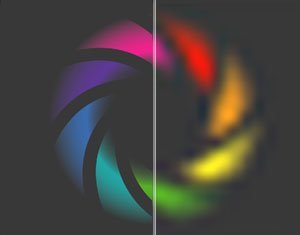
Once an image's DPI is set, it can be printed easily at a specific size. As noted above however, it is not required to set an image's DPI. In Photoshop, the DPI is used. That is really all that is needed to print an image yourself. Just as there are two ways to tell software how to print images, there are two ways to tell other people how to print images. Most photo labs ask for image size (such as 4x6, 5x7 or 8x10) and they figure out what DPI to use. Other places, won't ask for size but will require a specific DPI. For example, publication magazines often request 300 DPI images. Of course, simply setting the DPI to 300 will set the image size.
 |
|
| DPI correct | DPI too low |
It is possible to produce an image of a specific DPI and a particular physical size using something called resampling. This is what the resample option in Photoshop does. To use resampling properly, physical size and DPI must be both set properly in Photoshop and the resampling option must be enabled. When an image is resampled, its pixels are replaced by new ones to give the impression that the image is unchanged. Suppose a 300 DPI 8x10 image is required. Logically this implies 2400x3000 pixels (roughly a 7 megapixel image). If an 8 megapixel image is made into a 7 megapixel image, as required by the previous example, details from the 8 megapixel image must be left out, this is called filtering. If a 3 megapixel image is made into a 7 megapixel image, then new pixels must be invented, this is called interpolation. Interpolated images appear soft and blurry because they have more pixels but not more details. This is exactly why images cannot be printed at any size and why large print sizes require higher megapixel cameras.
Displaying
Computer displays and televisions have full-color pixels just like images. Each display pixel is just like a digital camera image pixel except that it has a fixed size. Thus, a display has a resolution in the Photoshop sense and a resolution in the image size sense. Note that displays can simulate different resolutions using something similar to interpolation.
When an image is viewed at 100% magnification, each image pixel appears in exactly one display pixel. In this case, the image's effective resolution , is the same as monitor's resolution and the selected image resolution is ignored. For example, a 22" monitorMonitor and TV sizes are measured diagonally which is 16" wide at 2048x1536 has a resolution of 128 DPI (2048/16 = 128). When an image is viewed at more than 100%, interpolation is used. Typical image viewing programs have a fit-to-fill mode which selects a magnification factor so that the image fits the entire window or screen. In fit-to-fill mode, an image which has less pixels than the window will be interpolated and an image which has more pixels will have pixels discarded. This explains why displaying images on a screen requires lower megapixels. Most common computer displays have less than 2 megapixels, so extra pixels of higher resolution images have to be discarded so that the entire image fits on the screen.

Printers
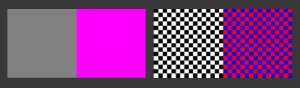
Printers too make images out of tiny dots. Most printers produce dots of a fixed size which is determined by the printer's resolution, also measured in DPI. Comparing image and printer resolutions can be confusing. At first glance, printers appear to have relatively very high resolutions (they are advertised as having up to 5600 DPI). The difference between an image's DPI and a printer's DPI is that each image dot can vary greatly in color and intensity, while a printer dot can be of exactly one color and intensity. For example, an image pixel must be reproduced using a number of printer dots. The combination of dots which tricks our eye into seeing a very specific color is called dithering.
Another fact complicates understanding a printer's resolution: the size of ink dropletsMeasured in picoliters. While a printer may advertise 5600 DPI which makes it seem like it can put 5600 dots side by side within one inch, droplets are typically not small enough for that. Thus, some printers may place a droplet at one of 5600 different positions within an inch, but cannot use consecutive positions. Therefore such a printer can not place 5600 dots within an inch. This is common among inkjet printers, where the paper type affects how much ink spreads and therefore the width of ink droplets on that paper type. Due to this fact, most printers can only print at their highest resolution on special paper that reduces the spreading of ink.
The relation between an image's resolution and a printer's resolution, determines how many printer dots can be used to simulate one image pixel.
 |
|
| Image pixels | Dithered pixels |
 Photography Articles
Please Support Neocamera
All information on Neocamera is provided free of charge yet running this website is a huge endeavor. Purchases made via affiliate links found throughout the site help keep it running and up-to-date. There is no additional cost to you, so please consider buying via these links to our affilates:




Thank you for your support!


Size/Resolution Calculator
Television
A television screen is made up of rectangular pixels. This means that the resolution (in the Photoshop sense) is different when measured horizontally than vertically. The consequence of this is that images displayed on a TV screen will appear deformed if they are not resampled. Because resampling produces different pixels than those in the original image, image quality is reduced. A standard TV has about 1/3 megapixel. The highest quality HDTV has roughly 2 megapixels.
Updates
2025.11.13

Best Gifts for Photographers in 2025 by Budget
The annual Neocamera Photography Gift Guide updated to 2025. Find great gifts for photographers with any price budget.
2025.07.07

Stellar Photo Recovery Review
Review of Stellar Photo Recovery V12. This Windows and MacOS software can recover photos and videos in a huge number of formats from memory cards, USB drives, SSDs and HHDs.
2025.05.14

Huion Kamvas 13 Gen 3 Review
In-Depth review of the Huion Kamvas 13 Gen 3 Pen Display Tablet for photographers and graphic artists.
2025.01.18

Fujifilm GFX 2025 Lens Roundup
Lens Review roundup of Fujifilm GFX Medium-Format lenses. Quality, performance and handling of the GF20-35mm F/4R WR, GF30mm F/3.5 Tilt-Shift and the GF55mm F/1.7.
2024.11.18

Best 2024 Photography Gifts for Every Budget
Great gifts for photographers and photo enthusiasts selected for every budget among the best products of 2024.
2024.08.07

Eye Protection Tips for Professional Photographers
The four main considerations for professional photographers regarding eyewear.
2024.07.14

Fujifilm X100VI Review
Flagship fixed-lens compact digital camera with a 40 MP sensor and Image-Stabilization, a first for the series. Retro design featuring dual control-dials, plus direct ISO, Shutter-Speed and EC dials. Its hybrid viewfinder can switch between EVF and OVF mode.
2024.05.09

Fujifilm GFX100 II Review
Flagship 102 Megapixels Medium-Format Mirrorless Digital Camera with 8-Stop 5-Axis IBIS, 8 FPS Drive, 8K Video and 400 MP Super-Resolution capture in a weatherproof and freezeproof body with dual control-dials and dual memory-card slots.
2024.04.03

Fujifilm X-T5 Review
Newest Fujifilm flagship boasting a 40 MP APS-C sensor, 5-axis IBIS with 7-stop efficiency, 15 FPS continuous drive, 6.2K Video capture, dual control-dials and dual SDXC UHS-II slots in a sturdy weatherproof and freezeproof body.
2023.11.20

Best Digital Cameras of 2023
Find out which are the Best Digital Cameras of 2023. All the new Mirrorless Digital Cameras from entry-level to high-end professional.
2023.07.10

Fujifilm X-H2 Review
40 Megapixels APS-C Hybrid Mirrorless Digital Camera with 7-stop IBIS. Fastest shutter ever and 8K video capture. Large builtin EVF with 0.8X magnification and 5.8 MP, plus an Eye-Start Sensor. Packed with features and large number of controls in a weatherproof and freezeproof body.
2023.05.07

Sony FE 20-70mm F/4G Review
Review of the unique Sony FE 20-70mm F/4G lens. The optical zoom of this lens spans ultra-wide-angle and medium focal-length coverage, making it one of the most versatile Full-Frame lenses on the market.
2025.11.13
2025.07.07
2025.05.14
2025.01.18
2024.11.18
2024.08.07
2024.07.14
2024.05.09
2024.04.03
2023.11.20
2023.07.10
2023.05.07
Camera Bag


Your camera bag is empty. To add a camera or lens click on the star next to its name.
Your camera bag is empty.
Add cameras or lenses by clicking on the star next to their name.
NEWS
2025.12.02

Sony Upgrades Alpha 7 to 5th Generation
Digital Camera ○ Lens
2025.11.29

Venus Optics Releases New Zero-D Tilt-Shift Macro Lens
Lens
2025.11.23
Best Digital Cameras of 2025
Digital Camera
2025.11.14

Photography Gift Guide 2025 Edition
2025.11.06
Canon Announces Third-Generation R6 Mirrorless
Digital Camera ○ Lens
2025.10.23
Fujifilm Launches X-T30 III Plus New Wide Zoom
Digital Camera ○ Lens
2025.10.21
Peak Design Unveils Field Plate and Form Straps
2025.10.16
Nikon Unveils Z-Mount DX Lens Duo
Lens
2025.10.16
Venus Optics Unveils Fast Telephoto Prime Lens
Lens
2025.10.01

Think Tank Photo FocusPoint RollTop Backpacks
Bag
2025.09.30
Sony Produces Super Macro GMaster Lens
Lens
2025.09.17
Venus Optics Created First Telephoto Ultra-Macro Lens
Lens

