Camera Basics
 Camera Choosing
 Camera Models
 Camera Buying
 DSLR Buying

Sony Alpha A700 Review
 12 Megapixels
 Single Lens Reflex
 Stabilization: Compensates for tiny involuntary movements of the camera.
 Continuous Drive
 Manual Controls: Both fully-manual (M) and semi-automatic modes (T and V).
 Custom White-Balance: Specifies exactly what should be white to the camera.
 Action Photography: Shutter speeds of 1/1500 or more.
 Night Photography: Reaches shutter-speeds longer than 4 seconds.
 Hotshoe: Allows external flash units to be attached.
 Spot Metering
 Depth-Of-Field Preview: Improve perception of DOF before shooting.
 Accepts Compact Flash memory.
 Accepts Memory Stick Duo memory.
 Neocamera detailed review
 Discontinued: No longer produced by the manufacturer. May still be in stock or found used.
 1 - Capability2 - Usability3 - Performance
Sony Alpha A700 Usability - How easy is it to use?
The shutter-release on this DSLR is a standard 2-stage release. The halfway point is rather soft, so it is easy to miss it and unwillingly take a picture. Some like this because they feel it takes less time to release the shutter. A possible advantage of this is that it reduces vibrations to the camera. In single-shot focus and DMF, half-pressing the shutter locks the focus and exposure. Focus can also be locked separately by using the spot-focus button located at the center of the 4-way controller. There is also an AEL button to lock exposure before the shutter is half-pressed.
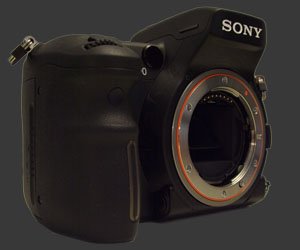
Ergonomically, the Sony Alpha A700 is great. It has a deep hand-grip with a small recession for the index-finder to keep it securely in place. The camera's rear has a small grip to prevent the thumb from slipping off to the side. Together this makes the camera exceptionally easy to hold. The A700's two control-wheel are located opposite to each other on the front and back grips. The very important AELAuto Exposure Lock buttons is reachable with a small movement of the thumb. The focus-override button is located under-your-thumb. This button serves either to lock focus or switch between auto focus and manual focus. Speaking of buttons, every one except the focus-override button is relatively large and has a durable feel. Understandably, the focus-override button is smaller and recessed, so that it is not often accidentally pressed. The entire camera feels solid and well balanced.
The A700 has a moderately large pentaprism viewfinder with a bright and clear view. The eyecup is large and also surrounds the eye-start sensor. The eye-start sensor ensures that there is no bothersome LCD glare when looking through the viewfinder. This is one feature that is hard to live without once you get used to it! Unfortunately, very few cameras implements this feature.
Exposure parameters are changed using either control-wheels. In P mode, one control-wheel activates shutter-priority shift and the other activates aperture-priority shift. In A and S modes, both control wheels control the same parameter by default. However, one control wheel can be configured to access exposure-compensation directly. In M mode, one control-wheel changes the aperture, the other changes the shutter-speed. The AEL button can also be used to modify aperture and shutter-speed simultaneously to maintain the set exposure.
The control-wheels are also used with 4 top-mounted buttons: exposure-compensation (EC), ISO, white-balance (WB) and drive.Multi-segment, center-weighed or spot While these parameters are being changed, an indication of the selected value appears in the viewfinder. MeteringMulti-segment, center-weighed or spot is controlled by a ring surrounding the AEL button.
Like all modern DSLR cameras, the A700 has a dedicated playback button and an image review option. When an image appears for review, it can be immediately deleted, zoomed-in or have its luminance and primary-color histograms displayed. All the same options are available in playback mode as well. During image playback, any control-wheel can be used to iterate through images without changing zoom-levels or display options. This is an effective way to compare the same area across a series of shots.
The A700 offers two ways to zoom into an image. First, there is the traditional way which is operated by directly changing the zoom factor and scrolling around the image. Second, there is an area-navigation way which works by moving and resizing a selection rectangle over the image. When the selection rectangle is in the desired position, the LCD can be made to see only the selected area by pressing a button. This approach allows zooming into a specific feature more rapidly.
There are three options for the LCD (which serves as a status display in shooting mode): off, simple and detailed. Obviously, when off the display shows nothing. The simple display shows basic shooting information using a very large font. The detailed display uses a medium font to display more information including modified image parameters. A display button to the left of the LCD iterates through all three modes. Our impression is that photographers will either be interested in the simple mode or the detailed mode, but rarely both since the latter is a superset of the former. For that reason it would be better if the display button was simply an on/off switch and the simple or detailed view could be chosen via a setup-menu option. Presently , when switching between the status display and having the LCD off, the user is required to press the button an extra time to bypass the undesired mode.
The Alpha stores images in sequentially numbered folders. Each folder can contain 9,999 images but a new folder, numbered sequentially after the last one, can be created at any time using the setup-menu. When playing back images, the display button optionally allows to display a row of thumbnails above the current picture. The AEL brings up a thumbnail view that allows to navigate between folders.
The LCD itself appears very impressive. At just under one megapixel, this is an incredibly precise display. Images appear quite sharp on this large and bright 3" LCD. Visibility is excellent, both outdoors and indoors. We have two gripes with the LCD: images are overly yellow and overly sharp. Indeed, all images we reviewed on the LCD were noticeably more yellow there than on a calibrated CRT. This has not been the case with other DSLR cameras before, so keep that in mind when trying out white-balance settings. It also seemed like Sony applied strong sharpening to image previews. The result was that some unsharp images appeared sharp on the LCD.
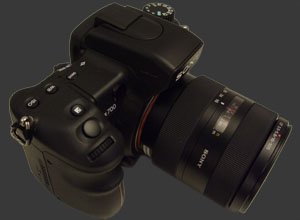
There is a menu item which selects the memory card to be used since the Sony Alpha A700 directly supports both Compact Flash and Memory Stick Duo cards. When only one card is present inside the camera, the proper card type must be selected, otherwise an error message is displayed. We have no idea why it simply does not detect which one is there and only use the menu system when two cards are present.
 |


|

 Next1 - Capability2 - Usability3 - Performance
Please Support Neocamera
All information on Neocamera is provided free of charge yet running this website is a huge endeavor. Purchases made via affiliate links found throughout the site help keep it running and up-to-date. There is no additional cost to you, so please consider buying via these links to our affilates:




Thank you for your support!


Sony A700 Highlights


 SLR digital camera
Sensor-Size: 24 x 16mm

Actual size when viewed at 100 DPI
| 12 Megapixels DSLR | ISO 100-6400 |
| Sony A Mount 1.5X FLM | Shutter 1/8000-30s |
| 2-Axis Built-in Stabilization | Full manual controls, including Manual Focus |
| 95% Coverage Medium Viewfinder | Custom white-balance with 1 axis fine-tuning |
| Automatic Eye-Start sensor | Spot-Metering |
| Built-in Dust Reduction | Hot-Shoe |
| 5 FPS Drive, Unlimited Images | Lithium-Ion Battery |
| 3" LCD 920K Pixels | Compact Flash, Memory Stick Duo |
Camera Bag


Your camera bag is empty. To add a camera or lens click on the star next to its name.
Your camera bag is empty.
Add cameras or lenses by clicking on the star next to their name.
Updates
2026.05.21

Laowa 4.5-10mm F/2.8 Fisheye Zoom Lens Review
In-depth review of the Venus Optics Laowa 4.5-10mm F/2.8 Fisheye Zoom Lens. This lens zooms from a circular to rectangular fisheye with an 180° viewing angle. This review analyses its optical quality, construction and handling.
2026.04.13

Laowa 17mm F/4 Zero-D Shift Review
In-Depth review of the Venus Optics Laowa 17mm F/4 Zero-D Shift Lens. This ultra-wide Shift lens is specifically designed for Mirrorless Digital Cameras and is available in 4 Full-Frame mounts plus 2 Medium-Format ones.
2025.11.13

Best Gifts for Photographers in 2025 by Budget
The annual Neocamera Photography Gift Guide updated to 2025. Find great gifts for photographers with any price budget.
2025.07.07

Stellar Photo Recovery Review
Review of Stellar Photo Recovery V12. This Windows and MacOS software can recover photos and videos in a huge number of formats from memory cards, USB drives, SSDs and HHDs.
2025.05.14

Huion Kamvas 13 Gen 3 Review
In-Depth review of the Huion Kamvas 13 Gen 3 Pen Display Tablet for photographers and graphic artists.
2025.01.18

Fujifilm GFX 2025 Lens Roundup
Lens Review roundup of Fujifilm GFX Medium-Format lenses. Quality, performance and handling of the GF20-35mm F/4R WR, GF30mm F/3.5 Tilt-Shift and the GF55mm F/1.7.
2024.11.18

Best 2024 Photography Gifts for Every Budget
Great gifts for photographers and photo enthusiasts selected for every budget among the best products of 2024.
2024.08.07

Eye Protection Tips for Professional Photographers
The four main considerations for professional photographers regarding eyewear.
2024.07.14

Fujifilm X100VI Review
Flagship fixed-lens compact digital camera with a 40 MP sensor and Image-Stabilization, a first for the series. Retro design featuring dual control-dials, plus direct ISO, Shutter-Speed and EC dials. Its hybrid viewfinder can switch between EVF and OVF mode.
2024.05.09

Fujifilm GFX100 II Review
Flagship 102 Megapixels Medium-Format Mirrorless Digital Camera with 8-Stop 5-Axis IBIS, 8 FPS Drive, 8K Video and 400 MP Super-Resolution capture in a weatherproof and freezeproof body with dual control-dials and dual memory-card slots.
2024.04.03

Fujifilm X-T5 Review
Newest Fujifilm flagship boasting a 40 MP APS-C sensor, 5-axis IBIS with 7-stop efficiency, 15 FPS continuous drive, 6.2K Video capture, dual control-dials and dual SDXC UHS-II slots in a sturdy weatherproof and freezeproof body.
2023.11.20

Best Digital Cameras of 2023
Find out which are the Best Digital Cameras of 2023. All the new Mirrorless Digital Cameras from entry-level to high-end professional.
2026.05.21
2026.04.13
2025.11.13
2025.07.07
2025.05.14
2025.01.18
2024.11.18
2024.08.07
2024.07.14
2024.05.09
2024.04.03
2023.11.20