Camera Basics
 Camera Choosing
 Camera Models
 Camera Buying
 DSLR Buying

Pentax K-7 Review
 15 Megapixels
 Single Lens Reflex
 Stabilization: Compensates for tiny involuntary movements of the camera.
 Automatic Level: Corrects for some degree of tilt to keep the horizon level.
 Continuous Drive
 720p HD Video: 1280 x 720 resolution or more but less than 1920 x 1080.
 Manual Controls: Both fully-manual (M) and semi-automatic modes (T and V).
 Custom White-Balance: Specifies exactly what should be white to the camera.
 Action Photography: Shutter speeds of 1/1500 or more.
 Night Photography: Reaches shutter-speeds longer than 4 seconds.
 Hotshoe: Allows external flash units to be attached.
 Spot Metering
 Depth-Of-Field Preview: Improve perception of DOF before shooting.
 Weatherproof - Seals protect from dust, humidity and light splashing.
 Accepts Secure Digital High Capacity (SDHC) and SD memory.
 Neocamera detailed review
 Discontinued: No longer produced by the manufacturer. May still be in stock or found used.
 1 - Capability2 - Usability3 - Performance
Pentax K-7 Usability - How easy is it to use?
The ergonomics of the Pentax K-7 are rather good for a relatively compact DSLR. Its narrow body and 3" LCD has resulted in a less comfortable body than the K20D, yet it remains very efficient to use. It has a deep hand-grip with a clear indentation below the front control-wheel which is angled upwards for easy access by the index finger. The index finger comfortably rests on the shutter-release and can easily move back to the EC and ISO buttons behind it. A protrusion to the right of the thumb on the camera's rear ensures a secure hold. When gripping the camera with the index finger on the shutter-release, the thumb rests between the rear control-wheel and AE-L button. A green button is within easy reach just below the control-wheel. The camera feels very solid with a confidence-inspiring weight.
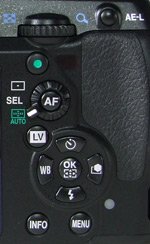 Most remaining buttons are crowded in a column below the control wheel. There are a large number of buttons to target pros who need quick access to functions under time-pressure. The green button inteligently varies its function depending on the camera mode. In P and M mode it resets the exposure to the program line. In other modes it automatically sets the ISO sensitivity. When used in conjunction with the EC button, it resets the applied EC value, perfect for preparing for the next shot. It resets White-Balance fine tuning from the WB setting screen as well. The AF button below it either engages or cancels autofocus, depending on a custom setting. This button is surrounded by the 3-way focus-point selector. The 3 options it provides are center-focus, manual-selection and automatic-selection. Setting the focus point manually requires pressing the OK button. This shows an indicator in the viewfinder which means that the 4 direction buttons now move the focus point. Pressing the OK button again returns to normal operation.
Below the AF button is the Live-View button which toggles live-view on and off. Entering live-view raises the mirror and shows a feed from the sensor and a live histogram. The camera has an incomplete live-view implementation which does not show exposure accurately. Since this camera is also equipped with a 100% coverage optical viewfinder, the only thing live-view serves is to show white-balance accurately. Framing and focus can be seen by the OVF as accurately.
A 5-way controller, made of 5 separate buttons follows just below the LV button. Each direction activates a setting like Drive-Mode, Image-Parameters, Flash-Mode and White-Balance. The last two buttons in the column are the Info and Menu buttons. Info shows an editable status display and Menu does the obvious.
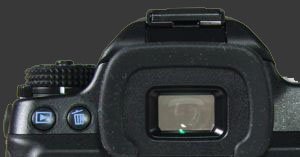 The K-7 has a large pentaprism viewfinder which provides a bright and clear image with 100% coverage and 0.92X magnification. The optical viewfinder is surrounded by a soft and comfortable rubber frame. To the left of the OVF are the playback and delete buttons. This Pentax is shooting priority, like all current DSLR cameras. Half-press the shutter and the camera is instantly ready to shoot.
A large and high resolution LCD screen finds itself below the viewfinder and Play/Delete buttons. The 3" LCD has an excellent angle-of-view and outdoor visibility due to a very good anti-reflective coating, the best we have seen so far. The display is unfortunately flush with the left side of the camera so it constantly gets nose marks. It also often gets hand-prints when reaching for the Play or Delete buttons. The small size of the K-7 and its numerous buttons really contribute to this cramped design. Another minor problem is that the left strap eyelet is forwards of the camera. That makes the neck-strap easily interfere with the mode-dial.
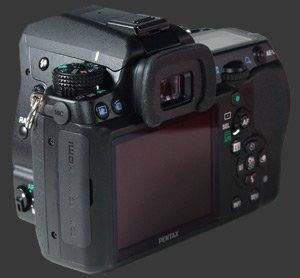
The two control-wheels are extremely well used, providing direct access to exposure parameters. A great usability feature of this DSLR is that whenever aperture or shutter-speed can be changed using a control-wheel it appears underlined in the viewfinder. This provides an indication as to the current exposure mode. It would have been even more helpful if the parameter controlled by the front wheel had a line above it instead of below. In program mode (P), called Hyper-Program, the control-wheels are used to enter aperture-priority (Av) mode and shutter-priority (Tv) mode. An excellent customization option of the K-7 is the choice of six program linesAuto, Normal, Speed-priority, Maximize Depth-of-Field, Minimize Depth-of-Field and MTF. In sensitivity-priority (Sv) mode, one control-wheel selects the ISO sensitivity, the other shifts exposureChanges between equivalent aperture and shutter-speed combinations.
In Av and Tv modes, one control-wheel selects the main exposure parameter, the other either performs exposure-compensation or selects the ISO sensitivity. When the second control-wheel controls ISO, the green button can be pressed to have the camera automatically set the sensitivity. A great touch is that the Pentax K-7 reports the selected sensitivity in the viewfinder and on the top-mounted LCD panel.
In TAv and M modes, a control-wheel selects the aperture, the other selects the shutter-speed. The difference is that M mode uses a fixed ISO while TAv mode tries to achieve a correct exposure by selecting the ISO. In Manual mode, the AEL button, in combination with a control-wheel, shifts the exposure. This provides a starting point for manually setting exposure.
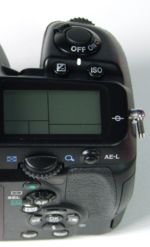 The control-wheels are also put to good use during image playback and menu navigation. The rear one zooms in and out, while the front one moves between images without changing the zoom level. This gives an effective way to inspect a detailed area of multiple images. To speed up menu navigation, the two control-wheels can also be used: one to iterate over the separate pages of a single menu and another to iterate over items.
ISO is selectable up to 6400. The lowest ISO is normally 100 but if highlight correction is enabled, that increases to 200. Shadow adjustement has no effect on the Pentax K-7's ISO range. There is also an automatic ISO setting which can be customized by selecting the minimum and maximum allowed sensitivity. Additionally, there is a setting which controls how fast the camera increases ISO, meaning if the camera prioritizes lowering the shutter-speed over raising the ISO. ISO sensitivity can be set using a dedicated button in conjunction with the rear control wheel.
There is unfortunately a flash-recommendation warning which cannot be turned off. This warning appears as a flashing lightning icon in the viewfinder when the shutter-speed falls below a certain fixed threshold. Having this flashing icon does get annoying after a while, so we are still hoping Pentax will add an option to disable it via a firmware update. This warning is not really useful as using a flash is frequently ineffective and can ruin the photograph.
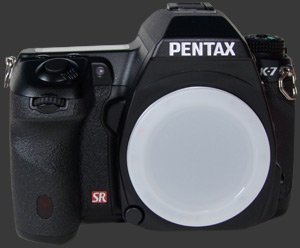
By now, it is clear that the K-7 is a well thought-out DSLR with priority given to direct access to common functions. At the same time, the Pentax K-7 has an unprecedented level of customization available. In the image parameter menu, activated by the right button of the 4-way controller, there are 7 modes: Bright, Natural, Portrait, Landscape, Vibrant, Muted and Monochrome. Each with five basic parameters: Saturation, Hue, Contrast, High/Low key adjust and Sharpness. There are 9 steps for each except sharpness which has 9 normal steps and 9 fine steps. With firmware 1.02, there are also 9 Fine Sharpness 2 step. To see the difference between sharpnes settings, see the K-7 Sharpness page. Additionally, there are two advanced settings: Highlight contrast and Shadow contrast.
The good news is that this flexibility provides complete control over the image appearance, taking over functions which used to done by RAW-conversion software. What is left is the daunting task of optimally setting these options. The effect of single-step changes is very subtle and hard to discern on the camera's display. One is therefore most likely to prepare a set of parameters and keep using it for most situations.
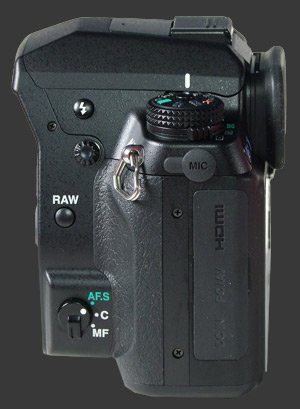 A switch on the front of the camera body selects between 3 focus modes: single-shot, continuous and manual. In single-shot mode, the camera will not take a picture unless focus-lock has been established. This can be done by pressing the shutter-release halfway or by pressing the AF button on the camera's rear. In continuous-focus mode, half-pressing the shutter keeps focusing constantly. In manual-focus mode, the camera very conveniently reports when one of the sensors has achieved focus. Focus confirmation is indicated in the viewfinder and, optionally, by a beep.
In the spirit of keeping things clear, the K-7 displays on its rear LCD a summary of its settings each time it is powered on or the mode is changed. The Info-button can be used to display current settings on the rear LCD on-demand. On the K-7, contrarily to the K20D, settings can be changed directy from the Info screen. These settings are: Auto ISO range, Program-line, Highlight correction, Shadow correction, Distortion correction, Digital filter, Extended bracketing, HDR, Lateral chromatc aberrations removal, image format, image resolution, image quality and stabilization. The direction buttons select the setting to change and a control-wheel changes it.
Since it's quite common to leave a setting such as white-balance or exposure-compensation incorrectly set and thus ruin a large number of images, several Pentax digital cameras, including the K-7, allow to specify which settings are reset on power-offFlash mode, drive mode, white-balance, sensitivity, exposure-compensation and auto-bracketing. This shows that Pentax thinks about common mistakes made by photographers. It would have been even better if users could specify the reset value for each setting as well. This simple change is implementable via firmware.
The Pentax K-7 supports two file numbering systems. One numbers images sequentially and groups about 500 images per folder. This apparently arbitrary limit is quite annoying as it often requires copying multiple directories from a single memory card. The other numbering system places files into folders named relative to the current date. The K-7 also allows users to choose the first 4 letters of filenames. Finally, this DSLR allows to specify copyright information to be embedded directly in image files.
 |



 
|

 Next1 - Capability2 - Usability3 - Performance
Please Support Neocamera
All information on Neocamera is provided free of charge yet running this website is a huge endeavor. Purchases made via affiliate links found throughout the site help keep it running and up-to-date. There is no additional cost to you, so please consider buying via these links to our affilates:




Thank you for your support!


Pentax K-7 Highlights


 SLR digital camera
Sensor-Size: 24 x 16mm

Actual size when viewed at 100 DPI
| 15 Megapixels DSLR | ISO 100-6400 |
| Pentax K Mount 1.5X FLM | Shutter 1/8000-30s |
| 3-Axis Built-in Stabilization, 4-Stop Improvement | Full manual controls, including Manual Focus |
| 100% Coverage Large Viewfinder | Custom white-balance with 2 axis fine-tuning |
| Auto Horizon Correction 1 Axis Digital Level | Spot-Metering |
| Weatherproof down to -10C | Hot-Shoe & Sync-Port |
| Built-in Dust Reduction | Stereo audio input |
| 5.2 FPS Drive, 40 Images | Lithium-Ion Battery |
| 1536x1024 @ 30 FPS Video Recording | Secure Digital High Capacity |
| 3" LCD 920K Pixels |
Camera Bag


Your camera bag is empty. To add a camera or lens click on the star next to its name.
Your camera bag is empty.
Add cameras or lenses by clicking on the star next to their name.
Updates
2026.05.21

Laowa 4.5-10mm F/2.8 Fisheye Zoom Lens Review
In-depth review of the Venus Optics Laowa 4.5-10mm F/2.8 Fisheye Zoom Lens. This lens zooms from a circular to rectangular fisheye with an 180° viewing angle. This review analyses its optical quality, construction and handling.
2026.04.13

Laowa 17mm F/4 Zero-D Shift Review
In-Depth review of the Venus Optics Laowa 17mm F/4 Zero-D Shift Lens. This ultra-wide Shift lens is specifically designed for Mirrorless Digital Cameras and is available in 4 Full-Frame mounts plus 2 Medium-Format ones.
2025.11.13

Best Gifts for Photographers in 2025 by Budget
The annual Neocamera Photography Gift Guide updated to 2025. Find great gifts for photographers with any price budget.
2025.07.07

Stellar Photo Recovery Review
Review of Stellar Photo Recovery V12. This Windows and MacOS software can recover photos and videos in a huge number of formats from memory cards, USB drives, SSDs and HHDs.
2025.05.14

Huion Kamvas 13 Gen 3 Review
In-Depth review of the Huion Kamvas 13 Gen 3 Pen Display Tablet for photographers and graphic artists.
2025.01.18

Fujifilm GFX 2025 Lens Roundup
Lens Review roundup of Fujifilm GFX Medium-Format lenses. Quality, performance and handling of the GF20-35mm F/4R WR, GF30mm F/3.5 Tilt-Shift and the GF55mm F/1.7.
2024.11.18

Best 2024 Photography Gifts for Every Budget
Great gifts for photographers and photo enthusiasts selected for every budget among the best products of 2024.
2024.08.07

Eye Protection Tips for Professional Photographers
The four main considerations for professional photographers regarding eyewear.
2024.07.14

Fujifilm X100VI Review
Flagship fixed-lens compact digital camera with a 40 MP sensor and Image-Stabilization, a first for the series. Retro design featuring dual control-dials, plus direct ISO, Shutter-Speed and EC dials. Its hybrid viewfinder can switch between EVF and OVF mode.
2024.05.09

Fujifilm GFX100 II Review
Flagship 102 Megapixels Medium-Format Mirrorless Digital Camera with 8-Stop 5-Axis IBIS, 8 FPS Drive, 8K Video and 400 MP Super-Resolution capture in a weatherproof and freezeproof body with dual control-dials and dual memory-card slots.
2024.04.03

Fujifilm X-T5 Review
Newest Fujifilm flagship boasting a 40 MP APS-C sensor, 5-axis IBIS with 7-stop efficiency, 15 FPS continuous drive, 6.2K Video capture, dual control-dials and dual SDXC UHS-II slots in a sturdy weatherproof and freezeproof body.
2023.11.20

Best Digital Cameras of 2023
Find out which are the Best Digital Cameras of 2023. All the new Mirrorless Digital Cameras from entry-level to high-end professional.
2026.05.21
2026.04.13
2025.11.13
2025.07.07
2025.05.14
2025.01.18
2024.11.18
2024.08.07
2024.07.14
2024.05.09
2024.04.03
2023.11.20